
Skip to content

Workforce

Article Author: Jana Reserva

Jana Reserva is a content manager for Workforce.com.

Posted on November 17, 2023November 15, 2024

Performance Improvement Plan: Guide + Template (2024)

oil painting of rocket taking off

Summary:

  • A Performance Improvement Plan (PIP) is a road map for employees to improve on performance issues. Its primary goal is to help underperformers do better.

  • Use this free template to get started with drafting a PIP. 

  • Performance management software can help you quickly build and execute PIPs. 


Performance Improvement Plans (PIP) often elicit mixed reactions in the workforce. Some view them as a precedent to termination, while others perceive them as an opportunity to improve and grow. This guide will shed light on the truth about PIP, what it’s for, its significance, and how to navigate it effectively for workforce development and success. 

What is a Performance Improvement Plan (PIP)?

A performance improvement plan (PIP) is a part of performance management that involves a formal document to track employee performance in specific areas where they are underperforming. It’s not disciplinary action per se, but a way for employers to assist employees in improving their performance and overcoming performance deficiencies.

Get a free PIP template by clicking the link below:

Performance Improvement Plan [Template]

While often viewed as a precursor to terminating an employee, implementing a PIP is actually done for retention. It provides an action plan with clear direction on what an employee should do to perform better in their role. 

A PIP also provides documentation in case an employee fails to meet the metrics in the performance plan, which can be used as grounds for dismissal. But again, the primary goal of a PIP is to help employees succeed and prevent turnover in the first place. 

What should a PIP include? 

To be effective, a PIP should be able to provide clear expectations and structure. It should outline relevant goals and give timelines for when these goals should be completed. 

An employee performance plan should include the following: 

  • Itemized areas that need improvement
  • Goals that employees need to meet. These should be SMART — specific, measurable, achievable, relevant, and time-bound. 
  • Specific action items that employees must take to improve their performance
  • Metrics to measure progress
  • A timeline and clear expectations for when goals should be accomplished
  • Support that the employee can expect in terms of training, coaching, and additional tools that can help them with attaining the goals 

Who’s responsible for enacting a PIP? 

Human resources typically oversees the filing and management of performance improvement plans, while an employee’s manager usually determines the need for a plan and carries out the execution. Because PIPs are usually received negatively, it’s crucial to determine if this is the appropriate course of action. The HR team also has an essential role in spotting potential biases guiding managers and employees as an intermediary party. If the need for a PIP is substantiated, the manager will draft the plan, and HR will review it accordingly. 

Meanwhile, other organizational stakeholders may also be involved in reviewing the PIP. It’s best if they are not directly involved in the situation so that they can review the plan with fresh eyes, ensure objectivity, clarify potential vague areas, and ensure there’s no potential risk of unintentional discrimination. 

When must a PIP be implemented? 

In some organizations, PIPs are used as proactive training measures for every employee, especially when there is potential for upward mobility. In this case, PIPs can be implemented on a regular basis, typically at the beginning of a new quarter. 

However, if you are reactively using PIPs as a response to poor performance, you’ll want to hold off on implementing them until patterns in underperformance emerge. PIPs are usually not the first course of action for performance issues – they typically come later in the evaluation process after notices and verbal warnings have been issued. 

At the first sign of a performance issue, managers typically confer with the concerned employee to notify them and provide initial coaching. If the issue persists, it can escalate to the verbal and written warning stages. The implementation of PIP usually comes at the written warning stage, where action steps and progress need to be documented. 

What are the steps to implementing a PIP? 

Executing a PIP is not a simple task. It involves careful investigation and clear communication. To get you started, here’s a quick rundown of the steps involved in the process: 

Identify the root cause 

First, you need to understand what’s causing poor work performance in order to set relevant goals. 

If the performance lapse is around their tasks, identify if there’s a lack of training. Did the employee receive enough coaching? Is there adequate onboarding? Do they have access to training tools and materials?

Meanwhile, if the issue concerns attendance, you can look at your time and attendance system to spot patterns and other indicators in their timesheets and leave records. For instance, if the employee tends to be late or absent on a particular shift or schedule, try to determine why. Sometimes, it’s not necessarily the lack of training, but it could be something personal that the employee is going through.

Inform Human Resources

If an employee requires a PIP, you need to inform HR about it. Present the facts and why you came to that recommendation. If they deem a PIP necessary, you can begin by telling the employee and proceeding with a draft. 

Get the employee involved

No employee wants to hear they need to improve their performance, so you must be clear, calm, and helpful when delivering the news. 

Focus on the facts. Explain why a PIP is necessary and be clear about your intent to help them succeed. Reiterate that while termination may be an outcome if the plan doesn’t yield results, implementing a PIP actually presents an opportunity to not only fix performance but to go above and beyond expectations. A PIP could be the first step towards eventual promotion.

It’s also vital to involve them when devising the plan. Doing so allows you to see things from their perspective, which helps design challenging yet attainable goals. It also gives you insight into how they execute tasks and see areas where you can provide support. Ultimately, involving them sends the message that the plan is made for them and not against them.  

Create the plan

A PIP should provide clarity and structure around goals, timelines, scheduled check-ins, and training. 

An effective PIP begins with SMART goals — specific, measurable, achievable, relevant, and time-bound. For instance, simply saying, “David must improve performance,” is insufficient. Instead, involve a time frame and a quantitative goal, like: “David should not commit more than three kitchen-related errors in 30 days.” 

Furthermore, you must include a schedule for regular check-ins to track progress. This will open up the floor for communication and feedback. Use this time to see if they need additional support or if they have clarifications. In addition, consider conducting temperature checks. In some cases, employees may accept the PIP, but in reality, they use this to buy time before they jump ship to another organization. So check-ins are an excellent time to gauge whether an employee is still in it to stay or just doing it to delay their departure from the company. 

An effective PIP must include goals and schedules as well as the type of training and support the employee can expect from the company. While the goal is for the employee to carry out the PIP, the manager is responsible for providing assistance, support, and training. 

Sometimes, training can be as simple as shadowing another team member excelling in a similar role. The PIP documentation should include whatever training and support is agreed to. 

Let other people review the plan

Aside from asking for feedback from HR, consider sharing the plan with other managers not directly involved in the situation. This will help strengthen it in terms of objectivity and attainability. In addition, it also doesn’t hurt to ask your legal team to review it. 

While this additional step takes time, it’s important to somehow “stress test” the PIP as this can help it be more effective and avoid any vagueness or potential liability down the line.

Track and evaluate progress

Evaluate the employee’s progress through regular check-ins and performance reviews. This will help you gauge whether the PIP process is working. 

If the employee could meet performance goals ahead of the set completion date, it would be advisable to continue the planned plan instead of ending it prematurely. While it’s good that the employee could bridge the gap fast, keeping the PIP going until the set end date is optimal to ensure that the employee can remain consistent. 

On the other hand, if the employee seems to be progressing but not at the expected pace, look at what’s causing the delay. Evaluate whether extending the timeframe makes sense or if additional training is needed. 

Improve your improvement plans

Executing a PIP is not an appealing prospect for managers because it’s a tedious process. It could also be an emotional ordeal, especially since it can result in termination. The good news is that some tools can help make some areas of implementing a PIP more manageable.
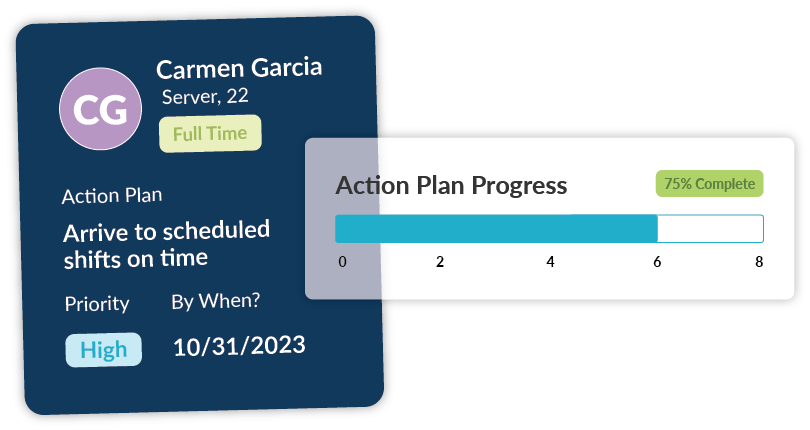
Graphic of a PIP in the Workforce.com platform

Workforce.com is an all-in-one system for the entire employee lifecycle, from onboarding to payroll. Alongside an extensive performance management module, Workforce.com includes time and attendance, employee scheduling, demand-based labor forecasting, payroll, and a full HRIS suite. 

Schedule performance reviews and execute action plans in an easy-to-use system tied to your scheduling and attendance data. This means you can quickly review information such as timesheets, punctuality and attendance issues, leave data, and even shift feedback all within the same system. Anchoring your performance management to operational data like this will always give you the complete picture. 

Streamline your performance improvement planning by booking a call with us today.

Posted on October 26, 2023September 12, 2024

Employee onboarding checklist: the basics [Free Template]

Astronaut Dog holding a clipboard and pen

Summary

  • Effective employee onboarding is vital for retention. It should be an experiential process as much as an administrative one that makes a good impression on new hires.

  • 50% of hourly workers leave a job within the first 120 days, wasting recruitment and training costs.

  • Click here for an employee onboarding checklist template.


You’ve been recruiting for a vacant position, and a candidate finally accepted a job offer. That’s great! But now comes the more crucial part — onboarding. Believe it or not, onboarding new hires involves more than a welcome email and signing an employment contract. 

Webinar: Best Practices for Onboarding Hourly Staff

Employee onboarding sets the tone for new hires; employers must show competency, inspire trust, and reduce friction. It is also where new hires get their first impression of company culture and see if the work aligns with what was discussed during the recruitment stage. 

*Psst! Click here for a free onboarding checklist. It’s comprehensive and all you should need to get started. 

The make-or-break stage

Half of hourly workers leave a job within the first four months or 120 days, according to SHRM. Turnover like this can be mitigated with proper onboarding techniques. 

While primarily an administrative process, onboarding is also an experiential process – this cannot be overlooked.

The most surface-level way to fulfill the experiential part of onboarding is to make it feel good. You also need to make it easy. Consider whatever system you use for onboarding; does the user interface (UI) delight the user? Is the user experience (UX) easy to navigate?

The experiential aspect of onboarding does not end after a pleasant-looking checklist is completed. You also need to integrate new hires successfully into the team and provide them with a sense of belonging. Typically, this takes at least 90 days.

Attracting candidates is only half the battle. The other half is retaining them, and that starts with onboarding.

How to improve your employee onboarding process

Employee onboarding can be daunting, especially considering its administrative and experiential aspects. A new hire checklist goes beyond gathering direct deposit information and signing tax forms. Here are some best practices to help you navigate this stage and ensure better employee retention.

Use employee onboarding software

If you find paperwork tedious, so does your new hire.

An effective onboarding platform significantly reduces the admin burden for the human resources team, hiring managers, and incoming employees. It streamlines the necessary paperwork and ensures data integrity by taking out manual processes.

Ideally, most onboarding-related admin tasks should be accomplished before the first day. For instance, with the Workforce.com onboarding system, new hires can upload the necessary pre-employment documents before they begin work. That means that contracts, W-4s, bank details, and employee personal information are all lodged into the system well before their start date. When these are done, you can focus on making a new hire’s first day more meaningful and productive. 

Prepare equipment and tools ahead of time

Aside from lengthy paperwork, you also need to ensure that tools and equipment related to the job are ready before a new employee’s start date. This includes uniforms, access to company systems and software, office equipment, or even vehicles if they are working on-site. 

The last thing a new hire should face on the first day is incomplete equipment or confusing guidelines. Welcome merch is all fun and good, but having the necessary work items and equipment ready can help your new hire settle in faster.  

Answer potential workplace questions before day one

Taking on a new role is exciting, but it’s normal for new hires to feel anxious about a new job. Much of this anxiety comes from the anticipation of meeting new teammates, acclimating to a different work environment, and easing into the organization’s culture.

Aside from discussing new hire paperwork and eligibility for benefits, it also helps to review smaller things like dress code, shift swap policies, unavailability, and day-to-day tasks.

Give managers support

Employee onboarding is a tall order, and the onus is on the team leaders and managers to ensure its success. 

Ensure managers have the support and tools to help them successfully onboard new team members. One way to do this is to let new hires fill out their own onboarding information rather than HR. When this kind of admin burden is taken from managers and placed on the employee, managers can focus on creating a better and more personalized onboarding experience for their new hires. 

Integrate onboarding with recruitment

Recruitment is how you attract top talent. Onboarding is how you keep it.

Recruitment is not just about selling the role to potential candidates and finding the best fit. It’s about setting expectations and painting a picture of what the position entails and what working for the organization is like. While the goal is to attract top talent, it’s detrimental to over-promise in terms of benefits, work environment, and growth opportunities.

Onboarding is the stage where the organization must meet the expectations set during the hiring process. This is the stage to follow through a good first impression. If employees find that the work is far from what was described during recruitment, they tend to quit even before they are fully onboarded. 

Recruitment and onboarding must go hand in hand. You must integrate them to avoid unnecessary recruitment costs, staffing issues, and high turnover rates.  

Set onboarding milestones

Tracking new hire onboarding success is best done with a roadmap that includes a set of milestones. 

What do you want new hires to learn or achieve within specific timeframes? Typically, onboarding programs last at least 90 days. If that’s the case, you can set milestones for 30 days, 60 days, and 90 days. Goal setting is crucial for successful onboarding. A roadmap provides new hires structure and specific objectives to focus on and helps managers track and measure a new employee’s progress. 

Give and gather feedback

Giving and gathering employee feedback is a massive part of onboarding. While feedback is typically given during milestones or scheduled check-ins, it should be more fluid and quick and can be part of daily job training and interactions. Feedback doesn’t always need to be a sit-down meeting. It’s also helpful when it’s quick and more spontaneous. 

Constant feedback is essential for developing new hires, but managers also need it to improve the onboarding process or operations. When new hires feel that their feedback matters to the team, employee satisfaction matters. When they feel heard and valued, they are more likely to see themselves in the organization for a long time.

Also read: How to improve internal communications with your hourly workers

Consider using templates

You would likely onboard new employees for certain positions more than once, especially when you run an hourly workforce. You’d probably do a lot of onboarding during peak seasons, especially when hiring seasonal or contractual staff. Using templates means that you don’t need to spend as much time curating an onboarding plan each time. 

Templates in the form of checklists, training materials, and video guides are helpful. However, remember to update them to reflect any procedural or policy changes. 

Make sure that such materials are accessible to new hires, mainly since they would most likely refer to them in the course of the onboarding period. A sound self-service system is vital to this, as it enables new hires to find answers to FAQs, and managers can focus more on clarifying more complex questions or matters. 

Incorporate fun elements

The onboarding process is crucial but doesn’t have to be boring. 

You can insert some fun elements to help new hires feel at ease as they integrate into the team. For instance, teammates can record a short video message that describes what the team or department does in a fun and informal way or tidbits of non-work related information such as the best place to go for meal breaks or coffee. Short and informal all-hands sessions also help familiarize a new hire with other team members. If your company provides a standard welcome kit or swag bag to new hires, consider adding a short welcome letter from the team for a personalized touch. 

Fun elements for onboarding don’t have to be full of fanfare, but incorporating those helps enrich the early stages of onboarding. 

New employee onboarding checklist template


The onboarding process takes place before the new employee’s first day. Here’s a checklist of key things you must remember during onboarding. Feel free to copy and paste for your own use or download a document here.

New hire documentation

  • Accepted and signed job offer/job description
  • Tax forms 
  • Insurance paperwork
  • Employment contract
  • Compensation and benefits package

Guides and policies

  • Employee handbook
  • Job description
  • Safety procedures/manuals
  • Security rules and policies

Accounts, devices, and equipment

  • Setup company email
  • Provide time clock access
  • Secure work uniforms
  • Setup credentials or access to necessary software tools such as HCM systems and project management software
  • Add new hires to relevant work chats or email distribution lists
  • Issue work phone, tablet, or computer
  • Assign workstation/workspace

First day

  • Team introduction
  • Workplace tour
  • Give welcome kit/company swag bag
  • Finalize other administrative paperwork, if any.

Orientation

  • Run through paperwork and make sure they’re complete
  • Briefly go through job roles, benefits, and insurance plans
  • Go over essential points in the handbook. Inform them where they can find a copy.
  • Discuss important company policies briefly.
  • Assign a mentor or onboarding buddy.

Development plans

  • Create 30-day development plan
  • Create 60-day development plan
  • Create 90-day development plan

Milestones and follow-through

  • Check-in after the first week
  • Check-in after 30 days
  • Check-in after 60 days
  • Check-in after 90 days

As you follow through and provide feedback, optimize if your development plan needs tweaking.


Simplify your employee onboarding

The template provided above is just to get you started. For more on how to optimize your onboarding process, check out our free webinar below featuring NBC-HWC certified coach Laura Timbrook:

Webinar: Best Practices for Onboarding Hourly Staff

Are you eager to streamline your onboarding right now? Discover how to reduce onboarding tasks to just 3 minutes with  Workforce.com’s self-service employee onboarding by booking a call today. 

Posted on October 11, 2023

Time clock rounding: best practices & compliance risks

Painting of a man adjusting a clock

Summary

  • The FLSA allows for time clock rounding, provided that it is done either neutrally or in a way that favors the employee.

  • Rounding to the nearest 5, 6, and 15 minutes are accepted under labor rules, but knowing when to round up or down can be tricky.

  • The right technology can equip companies to conduct time clock rounding while avoiding compliance violations.


Time clock or timesheet rounding allows organizations to round an employee’s clock in or out time by up to 15-minute intervals, often giving them cleaner employee hour numbers to work with. Still, the practice of time clock rounding has its limitations. 

While it is a common practice, there are liabilities that companies may face by relying on it, and the use of certain technology solutions may simplify the timekeeping and payroll process so that time clock rounding becomes easier. 

But first, let’s look at what labor laws say about it.  

Is time clock rounding legal?

According to the FLSA (Fair Labor Standards Act), employers can round their employees’ clock-in and clock-out time to the nearest 5 minutes, the nearest one-tenth of an hour or 6 minutes, or the nearest quarter hour or 15 minutes. 

So, yes, it’s legal, but you can’t just implement it haphazardly. The Department of Labor (DOL) allows this provided “it is used in such a manner that it will not result, over a period of time, in failure to compensate the employees properly for all the time they have actually worked.” 

On the other hand, the law also recognizes that there can be “infrequent and insignificant periods of time beyond the scheduled working hours, which cannot as a practical matter be precisely recorded for payroll purposes, may be disregarded. The courts have held that such periods of time are de minimis (insignificant).” However, it’s important to note that employers must count every actual minute spent working and should tread with timesheet rounding and de minimis time with common sense. 

When does timesheet rounding become illegal?

Time clock rounding becomes warrants legal action when it’s unfair to the employees and leads to inaccurate time cards.

At the maximum, employers can only round to 15 minutes or a  quarter of an hour. It’s a violation if an employee comes in at 8:12 and you round it to 8:30. Considering the 7-minute rule, you should round it to 8:15. 

If, for example, you round to the nearest one-10th of an hour or 6 minutes, and an employee clocks in at 8:58 and leaves at 6:04, it becomes a violation if you round to 9:00 and 6:00 because it is clearly to your advantage and you underpaid them for 5 minutes. It should be 9:00 and 6:06 to account for all time worked. Six minutes may not seem much, but if it’s consistently done, it can amount to hours of unpaid work overtime. And that can ultimately lead to wage theft and a costly lawsuit. 

While the law allows timesheet rounding, it can be tricky to navigate. And it would be best if you only did so unless it’s really necessary for you. 

Should you do time clock rounding?

It depends, but the most important thing to remember is that time clock rounding rules should be at least neutral and more to benefit employees. So, if your goal with rounding is to save on labor costs, there are honestly better ways to do this than timesheet rounding. Focusing instead on labor forecasting and scheduling based on demand as a means to optimize your costs is probably a smarter (and less risky) way to go.

Webinar: How to Forecast Your Schedule Based on Demand

The primary reason why business owners turn to timesheet rounding is for easier payroll processing, especially for those organizations that don’t have an automated system to track time. Rounding employee time gives organizations cleaner numbers to work with for payroll calculations.

Employers also do time clock rounding to promote flexibility and simplify billing and invoicing. 

But keep in mind that you need to consider employee perception in all of this. Employees might think that time clock rounding is being used to shortchange them. In the same vein, employees could also exploit the rules as a means of time theft.

The key here is to understand whether there is a need for timesheet rounding in the first place. And if there is, you must clearly communicate the policy to your employees. See to it that they understand why and how it’s done. 

Timesheet rounding rules

Three rules govern standard practices for timesheet rounding, and these are acceptable increments under the FLSA. You can opt to round time to the nearest 5 minutes, 6 minutes, or 15 minutes. 

Whatever increment you choose, know when to round up or down. The threshold is the halfway mark between these rounding increments and would determine whether you should round up or down. Say you’re conducting 5-minute rounding; the threshold is at 2.5 minutes. So, for instance, if an employee clocks in at 8:02, that should be rounded to 8:00. 

The key here is to know how to round employee time according to FLSA rules. While it seems straightforward, it can be tricky as there appears to be some ambiguity around de minimis time. 

“The de minimis doctrine is important in timesheet rounding cases because it asserts that the law can disregard infrequent or insignificant periods of time that would be impractical to precisely record,” Michael Cardman, legal editor at XpertHR, said. 

In Corbin v. Time Warner Entertainment, for example, the plaintiff alleged that he lost $15.02 because of his company’s compensation policy, and the court ended up rejecting the plaintiff’s argument that the company’s rounding policy violated the federal rounding regulation.

Meanwhile, Starbucks saw a different outcome in Troester v. Starbucks Corp. The plaintiff would clock out at night and still have a few tasks to complete to close the store. It added up to a short period of time every night, Cardman said. Starbucks wanted to exclude that time under the de minimis doctrine, but the costs added up along with potential overtime pay. According to the California Employment Law Report, over 17 months, the plaintiff did not earn wages on 12 hours and 50 minutes of work, adding up to $102.67 in wages.

Best time rounding practices

Should you need to implement time clock rounding, here are a few best practices to consider:

When in doubt, round in favor of employees

If for some reason you can’t round neutrally, always round in favor of the employee and not the employer; this limits your liability in the long run. 

For example, say a staff member clocks in at 7:57 a.m. and clocks out at 3:56 p.m. Rounding the start time to 7:55 a.m. and the end time to 4:00 p.m. would be in favor of the employee and maximize their earnings. Putting the employee first is always a safe bet for rounding time. 

Follow FLSA rules

Always adhere to federal law for timesheet rounding. More than following the accepted increments and thresholds—nearest 5, 6, and 15 minutes- you must also practice fairness when rounding employee time.

See to it that you’re not unconsciously underpaying your staff. A 3-minute discrepancy today may not seem much, but when these variances frequently occur, they can quickly balloon into a considerable amount.

Be careful with unpaid meal breaks

Rounding break times is not advisable, as you can violate state-based and federal rules. Employees must take these breaks and should be free from any work duties at this time, so it’s best to track actual minutes.

A good time-tracking software dramatically helps with this. For instance, Workforce.com has functionality that allows employees to clock in and out during break times. This helps ensure they take breaks and use all their entitled minutes. Not only will this promote a good working environment, but it will also help ensure that you remain compliant with applicable break rules.

Audit your timesheet rounding policy on a regular basis

Like any HR practice or policy, you must regularly revisit your time rounding policies. Operations evolve over time, and it’s best to reevaluate whether this policy still serves its purpose periodically. If you’re timesheet rounding policy makes bookkeeping and payroll easier, then you’re on the right track. However, if the policy is in place purely to save on labor costs, you’re treading dangerous waters. The law clearly states that rounding should be at least neutral and for the benefit of the employees. Labor forecasting and demand-based scheduling are more sound strategies for optimizing labor costs than rounding times to save a few minutes here and there. 

Get it right with automation

Rounding employee time without the aid of time and attendance software is risky. Without the proper safeguards in place, you could find yourself with erroneous data and consistently underpaid and unhappy staff. 

A time and attendance system streamlines how you record time entries and saves you from non-compliance issues caused by inaccurate rounding practices.

Workforce.com is a best-in-class HCM platform that simplifies time clock rounding. It tracks and records employee work times down to the second and can be configured to automate your very own time clock rounding policy. 

Discover how Workforce.com can help you simplify time and attendance, employee scheduling, payroll, and labor compliance. Book a call to know more.

Posted on August 21, 2023February 16, 2024

10 Best Practices for Employee Surveys

Painting of a hand filling out a survey on a tablet

Summary:

  • Employee surveys are useful for judging general sentiment across a workforce.

  • Positive responses should not always be taken at face value – conducting follow-up discussions can provide valuable context. 

  • Follow through with specific action plans using an employee engagement platform. 


Job satisfaction is currently at its highest. A survey from The Conference Board found that competitive pay plays a part in it, but employee retention is also attributed to experience and culture. While such results are notable and perceived to be primarily positive, it isn’t easy to generalize that the findings apply to every organization. 

For instance, survey findings show that a hybrid workforce is more satisfied than fully remote or on-site employees. But if you run an hourly workforce for a retail store, hotel chain, or healthcare facility, offering remote work is obviously out of the question. Does this mean that you’re doomed to have an unsatisfied team? Definitely not. The key here is optimizing employee experience by making their jobs easier and more fulfilling. Conducting surveys helps you get this done. 

Employee surveys shed light on employee satisfaction, pain points, and performance issues. Here are 10 best practices to get valuable insights from your employee surveys. 

1. Take time to build the groundwork.

If you want to make the most of employee surveys, you need to take time to plan them out.  

First, you need to determine why you’re doing one. Doing one annually “just because” is not a good enough reason. If you’re conducting a survey just for the sake of it, you’re wasting resources, getting unreliable or skewed answers, and potentially risking low participation rates. 

Before you roll out an employee survey program, here are things you need to plan for:

  • The reason for doing the survey. There are several reasons why organizations do employee surveys. Commonly, it’s a way to assess developments from the last poll, measure employee engagement, and investigate what’s causing productivity dips. Whatever the reason, you need to be clear about what you’re trying to measure, as it will set the direction for the entire process and the correct type of survey.
  • The timeline for the survey. When do you plan to conduct the survey, and what is the timeframe for which you will gather and validate the responses?
  • The participants of the survey. Who needs to answer the survey? Will it be conducted across the board, or will only selected staff members need to respond? Again, the reason for the survey will help determine this. If it’s an employee engagement survey, you should probably distribute it across your entire organization. But if it’s to gauge interest in something specific, let’s say a new tip pooling policy, it might make sene to only ask frontline team members to participate and not managers.
  • The set of questions to use. Questions should align with what you’re trying to measure. If you’re assessing progress from the previous survey results, using the same set of questions might make sense. However, it’s important to still look at that questionnaire and weed out any unnecessary items or add more to help with your evaluation.
  • Implementation of findings. Who will implement programs or changes as warranted by the survey results? Follow-through is crucial for every type of employee survey. Yes, human resources has a huge role to play in this, but managers are at the forefront of making sure that initiatives are implemented. It’s vital that results are turned into initiatives and programs that improves business outcomes and workplace culture. 

2. Time it well.

The best time to conduct an employee survey depends on several factors. But as a general rule of thumb, it should be avoided during public holidays or busy seasons. 

If you’re trying to benchmark or see progress, you can schedule employee surveys at regular intervals, say once per quarter. For instance, if the survey aims to improve employee engagement levels, regular check-ins following the initial study will be good for tracking progress and changing current programs to improve results. 

It may also be a good idea to conduct surveys at significant employment milestones, such as while onboarding, during performance reviews, before and after a promotion, or during offboarding. 

If a company is about to undergo a significant change, consider conducting surveys before and after this restructuring as well; this will help you gauge how perceptions and sentiments change during a major shift.  

3. Formulate the right questions.

If you want your employee surveys to uncover the true state of what you’re trying to measure, you must ask the right questions. While it seems obvious, many organizations tend to stumble at this part because wording survey questions can be trickier than it looks.  

Remember that each person or respondent has some form of bias. Survey questions must be carefully worded to get as specific and objective answers as possible.  

Here are some tips: 

  • Use neutral wording. Experts at HBR advise using neutral terms instead of words that can have strong associations. So, for instance, terms like strong or taking long strides may have associations with male leaders, which can result in higher rankings of male leaders compared to female leaders.

Suppose you want to measure how your managers tackle complicated issues at work. In that case, it may be best to phrase the question “Does your manager discuss complex issues with precision and clarity?” instead of “Does your manager have a strong grasp of complex problems?”. Both may have the same meaning, but the former sounds more specific and neutral.

  • Keep questions focused on a single item. While it’s easy to clump related items together, it’s best to keep things separate so that it’s easier for respondents. For instance, you wanted to measure how employees perceive their salary and benefits. While both are part of your compensation package, it’s best to create two separate questions for them because employees may have different perspectives on the two. Employees may be satisfied with their pay but may not be too happy with their leave benefits.
  • Use rating scales and multiple-choice questions. These types of questions are good at getting specific answers and engaging respondents. Ensure that each question flows from one to the next and doesn’t jump from one topic to another. For instance, you want to ensure that questions about work responsibilities and tasks are grouped together while questions about leadership are also categorized differently.
  • Use some open-ended questions. Context is important when processing survey results, and open-ended questions can help. Such questions allow respondents to provide answers in their own words, enabling them to explain their thoughts and responses better. Two open-ended questions per 15 ranking or scale-type survey questions is a common practice for employee surveys.  
  • Keep it short. If you want a high response rate, keep your surveys concise. Respondents are likelier to engage with the questions if they are direct and varied.

Also read: A complete guide to employee engagement for shift-based work

4. Develop a communication plan

Proper communication is critical if you intend to achieve high response rates for your employee surveys. Think of it like a marketing plan, but this time, your employees are your target audience. You need to get their buy-in and make them see what’s in it for them. Communicate the goal of the survey in a way that highlights how the end result will benefit them.  

Aside from discussing goals and objectives, you also need to inform them of the survey process—when the survey will take place and how it will be conducted. 

Realize that communication is not just a one-off email announcement. A best practice is to communicate the survey through different channels, such as a series of well-scheduled email messages, face-to-face announcements by team leads, and push notifications via an employee app if you have it. Equip managers to also answer questions regarding the survey, if needed.  

5. Use data to identify critical issues

Maximize your data and use it to identify gaps and spot low-lying opportunities. 

For instance, does your time and attendance data indicate an increase in no-shows or tardiness? Using this indicator, you can frame your surveys to identify what’s causing the issue. Is this a logistical hitch, or is an underlying management problem causing it? You can find possible answers from your data, such as employee schedules being sent out frequently late. You can use your survey to confirm if that’s the case or uncover any other reason. 

Webinar: Tackling Critical Workplace Issues with SHRM

Numbers don’t lie. Your data can give you insights into current issues, and you can tailor your surveys to get to the bottom of these hiccups. On the other hand, data can also tell you what your organization is doing right, and the survey can help you identify different ways to reinforce that.  

6. Involve employees in survey design

Invite a small group of employees to do a test run of the survey. They can provide feedback on the questions and how it was conducted. This way, you can spot vague questions, improve unclear areas or statements, and remove or add more questions necessary. This extra step ensures that your survey will yield valuable results. 

7. Address confidentiality concerns

People tend to give honest feedback when they know that responses are confidential, especially on questions about critical matters. Disclose how the answers are collected and clarify if the survey is fully confidential or if they have the option to disclose their identity or not. 

8. Validate your findings.

Employee survey results should not be taken at face value. After collecting feedback, it’s best to validate your findings. Correlate answers with other relevant information you have, such as sales metrics and attrition rates. 

Sometimes survey data might seem optimistic, but there are cases where it’s indicative of another issue. For instance, while a team may rate their manager highly, this could be because the manager does not hold staff accountable for productivity or workplace professionalism. 

If anything is unclear, don’t stop until you get to the bottom of it. If answers are inconclusive, you can conduct a follow-up study. A focused discussion among a small group of employees can provide a clearer picture of what’s happening.  

9. Follow-through.

The point of conducting surveys is to improve your operations by understanding employee sentiment. What sets successful organizations apart is how they utilize survey results to optimize their workforce management and improve their work environment. 

Make sure to communicate survey results to the respondents. You can share high-level findings with everyone and be open to clarifications should some employees want to learn more. If necessary, develop action plans for specific employees, or outline a company-wide strategic initiative for all your managers. Doing either or both of these things promotes transparency, makes employees feel heard, and ensures appropriate action is taken. 

10. Use the right survey tools

An employee engagement platform is sometimes necessary to distribute surveys and organize responses across your workforce. 

The right platform helps in two ways. For one, you need to have an efficient way to distribute surveys and record responses in a single system that houses all of these so you can analyze them later on. 

The other important aspect is accessibility. Make it convenient for employees to access surveys and respond. It’s advisable to allow employees to answer surveys via their mobile devices as this gives them flexibility on when to answer the survey. 

It’s good to consider what avenues are actually accessible for your staff. Do they really have the time or desire to download a new app to complete surveys? This might be more work for them. Think about how to incorporate surveys into their day-to-day tools – perhaps via a time clock app or a self-service app that houses things they routinely access, such as their schedule, time off balances, and paystubs. 

Distributing surveys through regularly accessed channels is critical for a good survey response rate. This also keeps things as unintrusive as possible. Employees are busy getting things done; they don’t have time to answer survey questions on a clunky, one-use platform.

If a company is about to undergo a significant change, consider conducting surveys before and after this restructuring as well; this will help you gauge how perceptions and sentiments change during a major shift. 

Make your surveys a part of a comprehensive feedback system.

Feedback should go beyond annual employee surveys. There are issues you can address more spontaneously if you gather feedback more quickly and frequently. 

An excellent example of this is allowing your employees to rate their shifts in real-time, right after their shift, directly from a time clock. This method helps you quickly identify top-of-mind problems for your staff. 

The key here is a sound feedback system that integrates short- and long-term feedback processes. Workforce.com, for instance, has an employee engagement system that allows you to collect regular data from shift feedback and irregular data from one-off pulse surveys. A system like this helps you navigate through responses and turn them into action plans for maintaining employee happiness, improving company culture, and increasing profitability. 

See it in action and book a call today. 

Interested in more ways to engage your employees but tired of reading? Check out our webinar below featuring Laura Timbrook, an NBC-HWC, CHC, and AADP certified coach and podcaster, where she covers actionable solutions for managing things like absenteeism and turnover.

Webinar: How to Drive Engagement for Hourly Workers

Posted on August 15, 2023February 16, 2024

3 things to remember when calculating labor costs

Astronaut Dog Crunching Numbers on a Board

Summary

  • Calculating labor costs can be complicated, involving things like benefits, taxes, and overhead expenses.

  • While labor costs are a natural part of running a business, there are ways to cut down on them without sacrificing employee or customer experience.

  • Scheduling and labor forecasting software is vital for calculating labor costs accurately. 


A crucial part of any company’s profitability is calculating labor costs correctly. Whether you’re a small cafe, a chain of restaurants, or a global enterprise, you need to know how to calculate the cost of your labor and understand how it affects your bottom line. 

Here are three essential things to consider when trying to figure out how much you’re actually spending on labor, how to remain profitable, and how to ensure your employees are getting paid accurately. 

1. Labor costs go beyond wages. 

Obviously, wages make up the majority of your labor costs; however, you need to remember that you are spending much more on employees than just wages. 

For employee compensation alone, wages and salaries cost employers 69% of the total cost, while 31% accounts for benefits, according to the Bureau of Labor Statistics (BLS). On top of that, there are other things to account for, such as taxes and overhead costs. Here’s a quick rundown:

  • Salary – As mentioned, this takes up a considerable portion of your labor costs. This is the monetary value that you pay your employee for the work they perform.
  • Payroll taxes – Some of these are taxes withheld from the employees and are typically matched by employers by a certain percentage, including Social Security payroll tax and Medicare payroll tax. 

Meanwhile, there are payroll taxes that are shouldered by employers alone, such as the federal unemployment tax (FUTA).

In addition, you should also account for payroll taxes imposed on a state and local level.

  • Benefits – Benefits such as paid time off, health insurance, and dental insurance also factor into your labor costs, particularly if the majority of your workforce is salaried.
  • Overhead costs – These are costs associated with running the business, such as building costs, utilities, property taxes, transportation, and administrative costs. 

Clearly, calculating labor costs should be inclusive of both direct and indirect expenses. Direct expenses are for producing a product, such as the wages of people in charge of production or rendering your services. While indirect costs are supplementary to that, such as administrative staff wages and building and equipment costs. 

Navigating the different factors affecting your labor cost is complicated and laborious, but it’s vital to understand all the costs and expenses that go into it. Doing so helps you determine profitability, spot areas where you can save, adjust your pricing, and determine business feasibility. 

2. Yes, you can save on labor costs. 

A lot goes into labor, and, of course, most of its cost is necessary. However, the good news is that labor is your most controllable expense; this means that the easiest way to reduce your overall operating costs is to optimize where and how you are spending on labor. Here are some of the things you can do to cut down on unnecessary labor costs:

Eliminate time theft

Time theft occurs when employees receive pay for time spent not working while technically on the clock. Buddy punching, inaccurate clock-ins, falsifying timesheets, unrecorded breaks, and attending to personal affairs while on the clock are some of the ways time theft is committed. 

The thing about time theft is it can be difficult to notice since instances of it are typically small and irregular. But over time, these occurrences can balloon into significant dollars lost. 

Solving time theft ensures everyone is working when and where they should be. To do this, you need an airtight time and attendance system complete with geofencing, photo-ID clock-ins, and pin numbers. All of these measures and more help ensure the right people are recording their time accurately and truthfully. 

Also read: 5 ways employees commit time theft (and how to reduce them)

Build schedules based on demand

Accurate demand forecasting is the key to both saving on labor costs and improving your ability to meet customer needs. Knowing exactly where and when you expect high foot traffic or sales can prevent accidentally over or understaffing shifts. Being prepared also helps reduce instances of unnecessary overtime as you’re less likely to request staff to keep working after the end of their shift due to an unforeseen rush. 

This all sounds well and good – but how does one actually forecast demand? What factors go into it?

Webinar: How to Forecast Your Schedule Based on Demand


Well, a lot of factors affect demand and required labor. To have an accurate forecast, you need to look at things like historical sales, booked appointments, economic trends, weather, foot traffic, and more. A robust labor forecasting system uses machine learning to account for all of these factors. With it, you can paint an accurate picture of your upcoming demand and schedule your staff accordingly.  

Classify employees correctly

Managing labor costs starts with classifying employees correctly. Salary, benefits, tax rates, and eligibility for federal and state-based policies depend on their classifications.

Assigning the correct classification to employees is critical to paying them correctly and complying with labor laws. Therefore, you also avoid the risk of legislation and penalties due to non-compliance.  

Sync scheduling and time tracking

Tracking where you are overspending on labor helps solve a majority of your labor cost issues. By syncing your scheduling and attendance systems, you’ll be able to see variances on timesheets between scheduled time and actual time worked. At a glance, you’ll be able to quickly see the shifts where you are spending more than expected. 

Global pizza chain Domino’s saw tremendous success using this technique, reducing labor costs by 11% across Europe, Oceania, and Asia.

Case Study: Domino’s Pizza


Boost employee engagement

Employee engagement has a significant impact on the cost of your labor. According to Gallup, disengaged employees cost the world $7.8 trillion lost in productivity. That’s 11% of the global GDP. Aside from low productivity, poor employee engagement can also result in high turnover – this means increased recruitment, onboarding, and training costs. 

Webinar: How to Drive Engagement for Hourly Employees

While employee engagement programs usually come at a cost, that doesn’t mean you must break the bank for these initiatives. At the end of the day, it’s all about employees finding value in the work they do. Tailor programs that foster growth, flexibility, and good communication. Prioritizing these things doesn’t always mean hosting lavish events and activities; what’s more valuable is integrating regular feedback loops into daily workflows. 

3. Technology is vital to calculating labor costs, but…

You need to find a software system that suits your business; otherwise, it will just cause confusion, additional admin work, and potentially higher costs. When you use an inadequate system, you risk forfeiting a healthy ROI due to constant reworking and prolonged training expenses. 

When looking for an HCM platform to help you with labor cost calculations, here are a few functionalities you’ll need to consider:

Labor forecasting 

Go for a platform that has a robust labor forecasting capability. With solid labor forecasting, you can accurately schedule your employees according to demand. This, alone, can curb your labor expenses as you’re not at risk of over or understaffing, and you can keep overtime and differentials to a minimum.

Many platforms claim to have some form of labor forecasting, but not all are comprehensive enough. Look at how the platform forecasts and which factors it takes into account when creating demand predictions. Is it only creating predictions based on historical sales data? If so, there is a good chance it lacks flexibility and only looks at surface-level data.

Accurate time and attendance tracking

Time and attendance tracking is vital to paying people correctly, preventing time theft, and optimizing labor costs.

Make sure you go for a system that enables employees to clock in and out easily, whether on-site or out in the field. Another vital area is the speed by which these clock-ins are recorded on timesheets. A platform that can do it in real time would be ideal.

Determine how the system spots and flags potential issues with time and attendance. The last thing you want is to scour through timesheets manually to spot irregularities. 

Timesheet to payroll processing is another crucial element. What are the safeguards the platform has in place to ensure accurate computations? How easy is it to transfer approved timesheets to payroll? What’s the level of admin work needed, if any? 

Strong payroll system

Payroll systems have a basic but extremely important task: withhold necessary deductions, pay employees on time, and pay employees accurately. This might seem straightforward, but this whole process can be tedious when different employee classifications, benefits, and pay rates come into play. It can become even more difficult if scheduling and timesheet data have already been corrupted upstream due to poor time and attendance management. 

Labor compliance

To avoid costly DOL fines and class action lawsuits, you need to prioritize compliance with both federal and state wage and hour laws. Like forecasting, many HCM platforms claim to have some form of labor compliance feature. But not all are robust enough to keep pace with federal and state-based regulations. 

An ideal HCM system ensures compliance at every step of the employee lifecycle. This means it should be able to flag potential risks during employee scheduling, timesheet export, and payroll calculations. Furthermore, it should be consistent with any developments or changes in federal and state-based rules.

Employee engagement tools

How the platform handles employee engagement is another vital feature you should be looking for. Most HCM software help with sending out and processing employee engagement surveys. While that’s important, it also pays to have a feature that allows for more immediate feedback and employee recognition. It also pays to understand how they process the information gathered from these surveys and feedback loops so that you’ll know whether it would be beneficial in your decision-making process. 

Control your labor costs with Workforce.com

While it might seem like a daunting task to find a platform that covers all these areas, there is actually a fairly simple solution. 

Workforce.com is an HCM platform tailor-made for calculating labor costs for shift-based businesses. Within its ecosystem are tools for time and attendance tracking, demand-based employee scheduling, labor forecasting, labor compliance, employee engagement, HRIS, and payroll. 

Find out more about how Workforce.com can help you calculate labor costs by booking a call today. 

Posted on July 20, 2023November 28, 2023

What does floating holiday mean? Guide + Template

Summary

  • A floating holiday is a paid day off that an employee can use at their discretion to substitute for a public holiday.

  • Employers have no legal obligation to offer floating holidays but do so to increase retention and make their benefits packages more attractive.

  • Carryover and encashment rules are usually up to employer discretion unless there’s state-based legislation that dictates how they should do so.


Aside from paid time off, some companies offer floating holidays to make their benefits package more competitive and appealing. But what is a floating holiday exactly, and how does it work?

A floating holiday is a paid day off from work that an employee can use at their discretion, typically serving as a substitute for a public holiday. There’s no set date to take one; hence these holidays “float.” Click the link below to see what a basic floating holiday policy looks like:

Floating Holiday Policy Template

Like paid time off, floating holidays are not legally mandated by law, so it’s up to the employers whether to offer them or not. And if they do, they also decide how to implement them unless state-based legislation tells them otherwise.

According to statistics, 48% of companies offer floating holidays, allowing employees to observe a holiday on any day of their choosing.

Floating Holiday vs. PTO

A common question regarding floating holidays is how they differ from paid time off. The main difference lies in how they are given to employees. 

Floating holidays are typically awarded at the beginning of each calendar year or as soon as an employee joins a company. In contrast, PTO is usually accrued over a period of time. Furthermore, some paid time-off credits are carried over the next calendar year and encashed once an employee resigns. Floating holidays, on the other hand, are typically not rolled over the next year and are not paid out upon termination.

Floating holidays also take the place of public holidays, unlike traditional PTO. So, for example, a single floating holiday credit representing Easter could be used on a random day in February – this would mean, however, that the employee would then need to work on Easter. PTO, on the other hand, can be taken whenever without replacing a holiday. 

When are floating holidays used?

Floating holidays are typically provided to offer more flexibility. Therefore, they are usually taken whenever an employee wants. They can be used to observe a religious or cultural holiday that’s not typically part of regular federal holidays, celebrate a birthday or special occasion, or take a break or recharge. 

Can floating holidays be used for federal holidays? It depends. If your business also goes on break during regular federal holidays and you pay time off for your employees, there’s no need for your employees to take a floating holiday. 

If you’re open during holidays like Thanksgiving or Christmas, employees who choose to work on those days can take a floating holiday another time. Remember that not all employees observe these holidays and may opt to work and take time off on a date that’s more relevant to them instead. For instance, a Muslim employee may opt to work on Christmas and take a floating holiday to observe Eid Al-Fitr. 

Webinar: How to Drive Engagement for Hourly Employees

Setting parameters for floating holidays

The key to implementing a floating holiday policy is to set clear parameters. Here are vital parts it should include.

Eligibility

Will it apply to all employees, or will there be exemptions like contractual or part-time workers? Typically, floating holidays are given to all employees to help improve retention. 

Hiring date is also another thing to consider. It’s common for companies to offer two floating holidays at the beginning of the year. For instance, new hires joining from January to June can receive both days. However, employees hired in the middle of the year can be entitled to only one floating holiday for the remainder of the year. 

Number of days

How many floating holidays are you going to offer? It’s typical for most companies to give two floating holidays a year, but it’s vital to consider the nature of your business to come to an ideal number. 

Approval process

Define how employees should file for floating holidays. Include how many days in advance they must give notice and what system to use to log their request. Having these details specified allows employees enough room to plan. 

Carryover and encashment rules

Indicate what will happen to unused floating holidays. For example, can they be carried over the next calendar year? In case of resignation or termination, will unused floating holidays be encashed?

Whatever you decide, make sure that it’s clearly discussed in the policy. Unused floating holidays are typically not carried over to the next calendar year nor paid out upon employee resignation. However, in California, floating holidays are somewhat treated as paid vacation leaves. This means employers should encash unused floating holidays upon termination and allow unused leave credits to roll over the next year. 

Blackout dates

Blackout dates refer to periods or dates when employees are discouraged from taking time off or floating holidays due to high demand or extra busy operations. Again, make sure that it’s clearly stated in your policy if this is something you implement. 

Benefits of floating holiday

Employers are not mandated to offer floating holidays, but there are advantages to doing so. Here are some of the top reasons why companies choose to include them in their benefits package:

A way to give importance to diversity and inclusion

Giving floating holidays is a way to promote diversity and inclusion in the workplace. It helps to recognize that employees have different cultural and religious backgrounds and that you allow them to freely practice their beliefs.

Survey shows that employees who feel included are three times more likely to feel excited and committed to their organizations. Furthermore, a company’s inclusiveness is a primary factor that different respondents look at when considering career decisions or moves.  

Flexibility

Floating holidays offer flexibility to employees by allowing them more control over how and when they would like to spend a holiday. Aside from religious and cultural holidays, employees can use this to spend time on a hobby, attend to other important things, or have a restful day at home.

Less admin burden in managing holidays

If inclusion is a priority for you, that doesn’t mean you must create an exhaustive list of holidays to account for all religions and cultures in your workforce. Instead, you can choose a few major federal holidays to include in your paid holidays policy and supplement these with additional floating holidays, which employees can use as they see fit. Aside from giving your employees flexibility, you also free up your HR team from the burden of maintaining and updating that list.  

A more competitive benefits package 

To retain and attract top talent, you must have a competitive benefits package. Floating holidays help do that.

The US is one of the more advanced economies, but 1 in 4 US workers have no paid vacation benefits. Furthermore, there’s no law mandating organizations to provide PTO. Having a PTO policy gives you a more competitive edge, but offering floating holidays can improve your chances of employee retention. 

Best practices for implementing floating holidays

Floating holidays are only effective when implemented correctly. Here are some best practices you can apply to get the most results from this policy.

Be clear with your policy

We can’t stress this enough. You need to eliminate any inch of ambiguity so that your employees will be encouraged to use their floating holidays. Since floating holidays do not roll over into the following year, any unused hours will go to waste – make sure your employees understand this with constant reminders. In addition, make sure that the policy is readily available to your team. It’s best to use an employee self-service platform to make this policy accessible to your staff at all times. 

Use a PTO tracking app

The best way to stay on top of PTO and floating holidays is to use a comprehensive leave management system featuring mobile PTO tracking. 

PTO tracking software is vital for efficiently managing leave requests and approvals. It ensures managers don’t miss requests or accidentally schedule staff who are on leave. 

But it shouldn’t just be helpful for managers. PTO tracking apps should be user-friendly for frontline staff; otherwise, introducing one will create even more confusion. Make sure basic tasks like viewing leave balances and floating holiday credits, submitting PTO requests, and seeing time off on schedules is as straightforward as possible for your staff. 

Encourage employees to use their floating holidays

This actually extends to all leave types. Statistics show that of US workers who have paid time off, only 54% of Americans say that they use it for vacation or holiday. 

The only way that you’ll see floating holidays positively impact your culture is if they are used by staff. It all boils down to communication and culture. Sometimes, employees need a little nudge or reminder that it’s okay to take a break and go on holiday.

Use labor forecasting to identify necessary blackout dates

The appeal of floating holidays is that employees can take them whenever they want. But blackout dates take a little bit of that away. The key is identifying only necessary dates when employees are discouraged from utilizing their floating holiday. 

Accurate labor forecasting looks at seasonal trends, historical sales data, booked appointments, foot traffic, weather, and other relevant information that can affect demand during any shift. Labor forecasting software shows you which days and shifts you can expect to be the busiest. Based on this, you can make calculated staffing level projections and narrow down the periods that need to be blacked out for leaves and holidays.

Webinar: How to Forecast Your Schedule Based on Demand

Stay compliant

While floating holidays are not legally mandatory, consider state-based legislation. As discussed, California looks at floating holidays like vacation days. Therefore, employees are required to encash remaining credits upon termination. Be careful of these specific rules to avoid violations and penalties.

It can be challenging to stay on top of compliance and how labor rules come into play with your benefits and policies unless you have a robust compliance engine within your HCM platform.

A good compliance feature automates labor compliance in every stage of workforce management—from onboarding, scheduling, administering benefits such as floating holidays, calculating payroll, and offboarding.

Floating Holiday Policy Template

If you want to get started on drafting a floating holiday policy for your company, here is a standard template to get you started: 


All (type/s of employees) are entitled to two floating holidays per year aside from (Company Name)’s regular paid holidays and time off. These two floating holidays can be used for any reason the employee deems necessary. It may be used for reasons such as birthdays, religious holidays, cultural festivities, or state and federal holidays during which [Company] remains open. 

Employees must submit a request at least five (number) days before they intend to use their floating holiday. It must be logged through the leave management system and approved by the manager. 

Meanwhile, floating holidays may not be used during blackout periods of (date range) due to high demand and seasonal events. 

Floating holidays are given at the beginning of the calendar year. Employees hired during the first half of the year will be entitled to two floating holidays. Meanwhile, employees hired in the middle of the year will receive one floating holiday. Floating holidays cannot be carried over to the next calendar year and will not be compensated upon termination.


Perks like floating holidays are just one of the many facets of managing a workforce. Make sure to implement them well with a robust system like Workforce.com. 

Aside from demand-based scheduling, labor forecasting, and time tracking, Workforce.com has an extensive leave management system that automatically tracks PTO and holidays while keeping you compliant with local labor laws in your state. 

See Workforce.com in action. Book a call with us today.

Posted on July 7, 2023February 16, 2024

Task Management 101: Advantages and Best Practices for Hourly Staff

Summary

  • Task management breaks down projects into smaller, more manageable duties.

  • Shift-based workforces can use task management to ensure daily work gets done efficiently and on time. 

  • Utilizing a checklist app makes tasks more manageable for shift workers.


Task management is the process of breaking down your operations or projects into smaller, more manageable tasks. It goes down to the granular level to identify every action item needed to run a productive shift or complete a project successfully.

In principle, you’re probably doing task management daily. An example would be going to work. Going to work involves smaller activities such as dressing up, making coffee, and commuting to the workplace. Task management functions in the same way. 

In organizations, task management helps managers and teams prioritize tasks, track progress, boost productivity, and ensure that things get done on time. However, while task management is closely tied to project management, they are different. Project management takes a 30,000 ft look at a project as a whole, whereas task management zooms in and deals with delegating and tracking specific jobs. 

Task management for shift-based businesses

Typically, task management is associated with white-collar organizations that run simultaneous projects, such as advertising agencies or software development companies. Such organizations usually work on long-running projects or implementations, using task management to assign and track action items. 

However, task management is also vital for hourly employees in industries like retail and hospitality. For these shift-based operations, task management defines what recurring tasks need to get done during every shift; this increases team productivity and accountability.

To successfully manage tasks, here are factors you need to consider carefully:

  • Time – When assigning tasks, ensure they align correctly with your schedule. For instance, stocking up on table essentials such as sugar packets and condiments is usually done before the restaurant opens and not in the middle of the day.
  • Resources – Take inventory of the things needed to accomplish a particular task. Consider tangibles such as supplies and tools and intangibles such as certifications or specific skills.
  • Dependencies – Are there any prerequisites to performing specific tasks? For instance, nurse handoffs are crucial from one shift to the next as they transfer vital and specific patient care information. Another example of dependency would be manager or supervisor sign-offs.

The goal of task management for hourly teams is to ensure productive shifts. The best way to do this is through a checklist system categorized by team and location. Take a look at this example:

Opening duties for restaurant FOH:

    • Set up tables and chairs
    • Sanitize surfaces and windows
    • Empty trash bins
    • Clean bathrooms
    • Arrange table napkins and other table placements
    • Restock tabletop essentials or condiment area with sugar packets, ketchup, salt, etc.
    • Stock bar with glassware and drinks

While the tasks seem part of a routine, they can easily fall through the cracks. Having specific to-do lists helps your team stay organized and focused on the tasks they must accomplish during the day. 

Why should you prioritize task management?

Want the short answer? Because it ensures things get done. At the end of the day, every organization wants an efficient and productive workforce – proper task management is one of the most effective ways to achieve this. 

Some dismiss task management because their daily operations remain fairly consistent. However, for some businesses, even a slight misstep can cause significant operational problems or even health and safety concerns. Task management shields your team from this kind of risk.

Here are some of the major reasons why task management is a must for hourly teams:

Increased productivity

Task management drives focus within teams, laying out precisely what needs to get done on a daily basis. Things like task checklists and due times ensure employees stay on top of their duties.

Autonomy and accountability

Task management gives your employees autonomy over their tasks. Because they know what they need to accomplish, they can manage their time better and focus on doing their tasks well even when managers are not around. 

Effective task management also signifies trust, and employees appreciate that. By handing off daily checklists to employees, they know it is up to them to complete these tasks on time and up to standard – and because it creates a paper trail, failure to finish tasks can easily be addressed. 

Better workflow

Teams work better when there are clear directions. Operations run smoothly when each employee knows their tasks on a granular level. Don’t mistake this for micromanaging. It’s about setting specific tasks and expectations for your team. 

Instructing your team to go ahead and have a productive shift is easy. But how do they do that exactly? This is where task management comes in. Think of task management as mapping out the necessary steps for achieving a successful shift. 

More visibility

Tracking shift responsibilities with software-based task management gives managers a glimpse into frontline operations. With checklists and due times assigned across an organization, managers can easily confirm that important work is getting done, who’s completing the work, and what time.

Improved prioritization

Task management enables you to allocate your resources better and prioritize tasks accordingly. Because everything is laid out, it’s easy to identify which tasks are more urgent than others. As a result, you can focus on what matters without overwhelming your employees.

Good customer service

Higher efficiency naturally leads to better customer service. When tasks are managed effectively, customers notice – it’s easy to sense if your operations are chaotic or your employees seem lost. Forgetting simple duties like restocking a particular shelf, cleaning a bathroom, or updating a menu can lead to poor customer experience. Task management keeps you from repeatedly making these kinds of mistakes. 

Best practices for task management

Task management seems like a straightforward process where you create a list of tasks for your employees per team, shift, and location. However, it may involve many moving parts, especially if you’re managing a midsize to enterprise-level hourly workforce. 

Here are some best practices to help task management work for you:

Use a task management software

Post-its and whiteboards are not cut for efficient task management. It’s best to utilize software designed to organize tasks, provide real-time task status alerts, and give you data and analytics on how your team is accomplishing tasks.  

Task management software keeps track of every task in each shift and notifies managers upon task completion. It also promotes transparency as everyone sees the same sets of tasks and has visibility on action items ticked off the list.

Track progress

More than completing things on time, a considerable part of task management is tracking completion. It’s important to see when tasks get done in real-time in order to stay on top of daily operations. Moreover, tracking completion helps you see where and when work is taking too long, what’s causing the delay, and how to address the inefficiency.

Evaluate your task management strategy

Just like performance management, task management should be an ongoing process. Day-to-day tasks can be repetitive but can change over time, especially when organizational shifts and market changes occur. 

For instance, demand will likely influence your team’s tasks. So consider when it will likely peak and ensure that your to-do lists are adequate to meet that uptick in demand. 

Meanwhile, revisiting your task management strategy allows you to pivot quickly in case of unprecedented market changes that will cause a significant shift in your operations. For instance, the disruption of COVID-19 caused in most workforces. 

Tie it in with the rest of  your workforce management

Task management shouldn’t be a siloed process. It would be best to integrate it with other areas of workforce management, such as employee scheduling.

Over time, task management will give you a wealth of data that can aid in optimizing schedules, tracking skills, and making critical workforce decisions.  

Webinar: How to Track Skills Development for Hourly Staff

Finding the right software for task management

Task management is no easy feat, but a reliable software system can simplify it. Workforce.com’s task management is the ideal solution for hourly workers. You can use it to create checklists lists for various teams and track real-time completion rates.

Workforce.com task checklist mobile view

Task management features are even better when synced with employee scheduling, time and attendance, and human resources. Employees can clock in, check their schedules, complete tasks, and get paid through a single app.

To learn more about Workforce.com’s task management platform and how it ties in with other solutions, book a call today. 

Posted on April 28, 2023October 31, 2023

What is employee self-service? [Guide]

Summary

  • Employee self-service (ESS) is technology that allows employees to perform HR tasks on their own such as updating their personal information, viewing pay stubs, and accessing company handbooks.

  • For shift workers, employee self-service goes beyond streamlining HR. It’s also about giving employees the flexibility they need to be productive in and outside of work.

  • A truly effective ESS software is one that’s optimized for daily operations – think access to schedules, reviewable timesheets, vacant shift claiming, and PTO management.


Updating personal information, managing benefits, and filing leave requests —these are all HR tasks that can be delegated to staff through employee self-service (ESS). But what is employee self-service exactly, and why is it important, especially for hourly workforces?

What is employee self-service?

Employee self-service refers to technology that allows employees to complete various administrative tasks related to HR, IT, and operations on their own. 

It’s all about providing a way for staff to easily get admin work done without going through a middleman. Some common tasks done through ESS include updating bank details, accessing employee handbooks and company policies, requesting PTO, managing and enrolling for benefits, editing timesheets, and much more. 

How does employee self-service work?

Employee self-service is usually done through a portal where employees can view and manage their employment details. Sometimes, ESS portals are managed internally via a company’s private intranet. However, most businesses run their ESS portal through HCM software.

In this instance, employees get their own login credentials and profile, where they can then access various things like their schedules, timesheets, benefits, time off, and more. ESS features allow employees to edit this information themselves without having to get HR’s help. 

The benefit of ESS features

Employee self-service goes beyond streamlining HR processes for hourly employees. It’s also about ensuring employees perform at their best each shift. Here are some of the unique benefits of implementing employee self-service:

Flexibility

Flexibility for shift-based workers is not about extra vacation days or working remotely. It’s about knowing their schedules ahead of time so that they can plan their personal life accordingly. 

Self-service gives employees the ability to see their schedules in advance, file leave requests, pick up open shifts, view their timesheets, and access their benefits or wages. All of these are crucial not only for daily operations, but for giving employees the tools they need to plan their lives accordingly outside of work. 

Efficiency

Employee self-service features are typically only possible if your business runs its operations and HR on a single, online system. With all your data in one place, it’s very easy for employees to update whatever information they need. This, in turn, streamlines things like onboarding, leave management, and timesheet approvals.

Employee self-service features also improve your response time to unexpected absences. Mobile features like shift swapping and shift bidding enable employees to schedule themselves whenever call-outs or no-shows occur.

Finally, communication is also another thing that ESS simplifies for hourly workers. It eliminates the lengthy back-and-forth communication that often plagues fast-paced work environments. Whether it’s a question about their schedules or a clarification about their timesheets, ESS speeds up the correspondence. 

Reduced administrative burden

At its core, self-service functionality really just makes life easier for managers and HR. By offloading basic admin work to employees, managers can spend more time on the things that matter. 

Employee onboarding, for instance, is an area where employee self-service features come in handy. DIY onboarding checklists reduce HR’s time spent on paperwork and data entry by allowing employees to fill in their own information and upload required documents. At the same time, new hires can also access the employee handbook and other relevant company policies as they integrate into the organization.

HR can use the time saved to focus on things like strategic initiatives and skills development programs. At the same time, frontline managers can spend more time on the floor and coaching their teams. 

Webinar: How to Track Skills Development for Hourly Staff

Increased team morale

Employees tend to be more satisfied with their work when a strong employee self-service system is in place. They feel that they’re trusted enough to do specific HR tasks on their own and that the organization values their time. 

Implementing a self-service system signals to employees that management trusts them; this inherently makes employees feel more valued. When things like timesheets, schedules, and PTO details are readily available for them to access, it leaves no room for ambiguity or miscommunication. Employees can rest assured that everything is in the system, and they can refer back to this information if need be. 

Challenges with implementing employee self-service

Implementing employee self-service in an organization can be challenging. Here are some of the hurdles organizations typically come across when trying to implement ESS in their organization:

Adoption

Resistance to change is a common challenge for organizations trying to implement employee self-service systems for their staff. Some employees may feel like learning the new platform is time-consuming and may prefer the traditional hands-off approach.

Training time

There’s a learning curve to using employee self-service systems, which can affect how receptive employees will be to the new system. It becomes more challenging when you have multiple platforms that employees need to learn. For example, you have one portal for scheduling and another for onboarding and benefits. Employees may perceive this as additional work and struggle to juggle multiple accounts.

Maintenance

Deploying an employee self-service system is not a one-time thing. It’s an iterative process. More than building an easy-to-do-business model, it also needs updated information. 

Think of it as a knowledge base or portal for your employees. Any update on policies, employee handbook, or standard operating procedures must be reflected in the system, which requires regular evaluation and upkeep. 

Analyzing adoption

Getting an employee self-service system up and running is just half the battle. The other half is monitoring how the employees are actually using it.

Analyzing how the system is used is vital to understanding your return on investment. By monitoring adoption and use, you’ll discover how staff engage with the system, what works well with it, and what features need to be improved.

Improving employee self-service for hourly workers

Employee self-service is only effective when it’s implemented correctly. Here are some best practices to realize its ROI for hourly workers. 

Prioritize ease of use

An employee self-service system is only as good as its interface. People tend to gravitate toward systems that are easy to use and low on time commitment. Don’t adopt a dated system with a clunky UI – it will only make employees’ jobs harder. 

Keep it all-in-one

For shift-based workforces, it’s important to have all self-service functionality housed in a single platform. If you can, only subject your employees to creating a single account for everything they need since it’s often confusing for employees to manage different portals.

Make it mobile

Employee self-service platforms are more effective when they’re app-based. Shift workers can’t be bothered logging into a communal desktop to do things like check their schedule or submit timesheets – they should have 24/7 access to whatever they need right from their phone.

Get user feedback

Ask your employees what they think about the system, and act on their feedback. A system may seem good on paper, but nothing beats real-time insight from the people who use it. 

Gather feedback from your employees, validate it, and then see how you can improve your ESS. Remember that implementing it is an iterative process. It should be consistently updated to maximize employee efficiency and satisfaction.  

Finding the right employee self-service software

The best employee self-service system is one that’s optimized not only for HR admin work, but for daily operations. 

At Workforce.com, we’re all about shift workers. That’s why we believe ESS needs to go beyond viewing and updating personal information. For shift-based teams, it needs to be dynamic enough to streamline scheduling changes, timesheet approvals, and much more.

Screenshot of an ESS portal on a phone
Workforce.com’s Employee Self-Service app makes it easier for staff to manage their information.

Workforce.com has a specialized employee self-service platform that allows them to view personal details, access contracts, view time off balances, check schedules, approve timesheets, and bid for shifts, all in a single platform.

Learn more about how Workforce.com’s employee self-service software helps hourly workforces around the globe. Book a call with us today. 


Posted on April 4, 2023August 3, 2023

What is skills management? Maximizing productivity and engagement

Summary:

  • Skills management is the administrative practice of assessing and recording employee competency in skills associated with their job roles.

  • Actively assessing, recording, and tracking skills competency not only assists HR functions like hiring and succession planning, but it also helps operations teams boost productivity and engagement. 

  • Use skills management software to easily assess and record employee skill levels across your workforce.


Are you making the most of the skillsets present in your workforce?

While you may be tempted to say yes, most would actually answer no. In fact, research shows that only 14% of business executives strongly believe that their organization is using their workforce’s skills and capabilities to their fullest potential.

Proper skills management is an underutilized strategy these days, especially within hourly businesses. But figuring it out could lead to higher productivity and better employee engagement in the long run.


What is skills management?

Skills management is the process of assessing employee job competencies and mapping them to your organization’s labor needs. Think of it like taking inventory of your resources; only this time, you’re dealing with talents, certifications, and skill levels.

Cataloging employee skills helps you identify skill gaps present in your organization. More importantly, it gives you the data you need to bridge these gaps, be it through upskilling, reskilling, or hiring new talent.

Webinar: How to Track Skills Development


Why should you adopt skills management?

Spoiler alert: it’s not a matter of whether you should or not. Successful organizations know that they actually need skills management. Here’s why:

Improve employee productivity

Skills management has long-term benefits, but it’s also a quick and relatively easy way to make an immediate impact on productivity. A good skills management strategy will give you insight into how to utilize employee skills on the front line better. This could take the form of scheduling staff with better customer service skills during busier shifts or pairing more qualified staff with new hires for difficult projects.

Keep up with emerging technologies and trends

Skills management allows you to project the trajectory of certain job roles. What will they look like down the line? Will they evolve and require new skills? Will they become obsolete?

Research shows that 59% of hiring managers expect that AI and other forms of workplace automation will cause a significant shift in the kinds of skills employees need to have. Actively tracking essential skills helps your decision-making regarding future talent needs.

Impactful succession planning

If a core team member becomes unavailable due to resignation or an extended leave of absence, can someone fill the gap?

Skills management provides insights for succession planning and ensures that your team and operations aren’t crippled when a good manager or senior staff member suddenly leaves or becomes unavailable.

Succession planning is the strategic transfer of knowledge to future-proof your workforce. Skills management gives you the data you need to execute this strategy. For example, you might use skill competency scores to determine whether any of your staff are suited for a management position. If so, great. If not, you can come up with a professional development plan to flesh out important skills needed for the role, or you can simply hire outside talent.

Make better hiring decisions

Skills management also provides direction for your talent acquisition. Roles evolve, technologies emerge, and workflows change. Skills management data can help HR navigate these shifts and equip them with the data they need to address talent gaps properly.

For instance, some organizations focus more on identifying skills needed for vacant positions rather than looking for candidates with matching job titles. This is called the skill-based approach and can be done either externally or internally.

Looking at your catalog of employee skills can inform these hiring decisions, whether internal or external, and put your organization in a better position to hire with confidence.

Improve employee retention

Along with burnout, wage issues, and a poor physical work environment, limited opportunities for career advancement also lead to high levels of employee churn.

74% of employees say that training and development are important to an organization’s strategy, but only 34% are happy with the organization’s investment in their skills and performance.

Webinar: How to Stop Employee Turnover

Employees find value in skills and development training, and even more so with opportunities that allow them to grow. You may have some training programs, but if they don’t meet staff aspirations, they won’t help retention. When you prioritize skills management, you’ll identify training opportunities that your workforce will find beneficial and worthwhile. It will allow you to curate learning and development opportunities that actually resonate with employees.


How to build a skills matrix

A skills matrix is the backbone of a skills management strategy. It is a tool to record, identify, and analyze the skills across an organization. Think of it as a grading system that allows you to see the skills present in your workforce, how they are being utilized, and if additional training or people are needed.

Here are the steps on how you can build an effective skills matrix:

Define the skills important to your workforce

This may seem straightforward, but it can be easily overlooked. These can be hard skills like coding language proficiency, or they can be soft skills like problem-solving, teamwork, and effective communication.

Break down these skills by team/job role

Doing this helps you make sense of what you should evaluate each of your employees on. For instance, keeping a record of a chef’s cash register competency probably does not make sense. Pick and choose what skills you will be evaluating employees on based on what skills are relevant to their role.

Evaluate each employee according to skill

Create a ranking system for each skill and grade your employees according to it. Self-evaluation, peer feedback, and performance reviews are useful ways to inform how you grade these competencies.

  • Employee self-evaluation – Ask employees to rate themselves according to their skills and competencies. While this may not paint the whole picture, this can give you a gauge of how employees perceive their capabilities.
  • Peer feedback – Feedback from co-workers is also a valuable indicator to gauge the skills of your workforce. This is first-hand information from people they work with and may provide you with more information on how they fare on a granular level.
  • Regular performance reviews – This insight comes from your managers based on their observations from daily operations and coaching sessions. This offers another perspective that can help validate what you have gotten from employees and their workmates.

Map out skill competencies to identify gaps

Once you have all the necessary information on staff skills, you can start mapping them out. You can do it manually on a spreadsheet or use a skills management system.

This skills matrix will give you a clear visualization of where your employees meet skill requirements and where they fall short.

While doing this manually is fairly straightforward for smaller businesses, large organizations may want to look for skills management software to streamline this process. This kind of software can also link directly with your scheduling system, meaning you can easily fill shifts according to skill and qualification requirements.


Best practices for skills management

Skills management can be daunting, especially with so many factors influencing your business goals and customer demands. To make the most of your workforce’s skill set, here are some best practices:

Make skills management an ongoing process

Skills management should be a continuous process, building upon previous iterations over and over until staff fulfill their potential.

If you have a skills management platform, it’s easy to check your team’s competencies anytime. Doing this allows you to address skill gaps and performance issues quickly. You can optimize schedules, revise training plans, assess the impact of emerging tech on certain roles, and set more timely check-ins with your employees.

Skills management should be closely tied to training and development

Skills management points your training and development efforts in the right direction. With a wealth of recorded skill competencies and needs at your disposal, you can easily devise training programs that have higher chances of producing results. Whether it’s upskilling, learning a new technology, or reskilling, you’d know the best type of training for your team at a particular time.

Use a skills management platform

It just makes things easier. Tracking and mapping skills to improve productivity is challenging, especially for bigger organizations. Having software do it for you eliminates the complexity of tracking your employees’ skill levels, increasing productivity, identifying gaps, and analyzing staff development. In addition, it interconnects your skills management with other important HR and ops functions, like performance, scheduling, attendance, and more.

Account for hard and soft skills

Technical skills are vital, but conceptual skills are equally important in a team. As you map your workforce’s skills, it’s best to consider both.

Hard skills refer to the technical competencies an individual needs to have to do job-specific tasks. Again, these skills can be learned with training and work experience.

On the other hand, soft skills are not job-specific competencies that typically include personal traits or characteristics. Communication skills, people or relational capabilities, and leadership traits all fall under soft skills. They are more challenging to measure than technical skills, but they indicate whether an employee can work with a team or thrive in an organization.

Take a look at the nature of a role to understand what soft skills are needed for it. For instance, client-facing functions should be for people with strong communication and people skills. Meanwhile, a head chef should have strong leadership capabilities to ensure that all kitchen stations are running smoothly.

Utilize a skills management platform

Developing both hard and soft skills is vital in today’s workforce. But, more than getting the job done, doing so helps with engagement and sets the tone for how well your team can work together.

Managing skills is one of the many moving parts of successful workforce management. To tie everything together, you need a system like Workforce.com.

Workforce.com’s skills management feature records, identifies, and analyzes skills across your organization. You can then optimize your schedules based on skills matrix data to ensure that best-fit staff are scheduled for the right shifts.

Book a call today to learn more about Workforce.com’s skills management platform and how it integrates with other WFM areas, such as employee scheduling, labor forecasting, and time and attendance.

Posted on March 20, 2023September 12, 2024

Termination Letter to Employee [Template + Example]

Summary

  • An employee termination letter is an official document given to employees to notify them that they are being let go. It should include the reason for termination, effective date, and next steps.

  • Employee termination letters should include the reason for termination, effective date, and next steps. They should be concise, factual, and carefully written.

  • While a termination letter is vital to the offboarding process, sometimes it is simply not enough. Most times it is essential to sit down with an employee face-to-face. 


An employee termination letter is vital to letting people go regardless of the reason. It is a written form of documentation that officially declares the termination of employment.

To check out some examples and templates, click here.

While termination letters may sound straightforward, there’s actually a lot that goes into them – and for good reason. Getting them wrong can lead to all kinds of issues for your organization down the road. So, let’s take a look at some ways to get termination letters right. 

Why are termination letters important?

Short answer: to avoid legal trouble.  

A termination letter should stand in court if ever the need arises. It’s crucial to make it airtight and leave no room for doubt and misinterpretation. If an employee feels they have been unfairly terminated, the letter may be used to point out discrepancies or unfair employment practices. 

Aside from legal issues, termination letters also play a role in ending things amicably with your employees. While it should sound direct and objective, a properly curated termination letter should provide every vital detail relating to the termination, such as the reason for termination, when it takes effect, and final compensation.

What an employee termination letter should include

While terminating an employee is never a pleasant experience, you can soften the blow by doing it properly – writing a sound termination letter is a critical part of this. Here are some things that every termination letter should include:

Basic details

First, a letter should include the who, what, and when. It must clearly state that it’s for ending employment, who it is for, and when it will take effect. It also should include contact information in case the employee needs more information or has questions. 

Reason for termination

The reason for termination is at the heart of this document, and the letter should be able to clearly state why an employee is being let go. Typically, termination is warranted due to the following reasons:

  • Downsizing or laying off – One of the top reasons for letting employees go is downsizing. If you’re writing a termination letter for this reason, you must explain the need to downsize and why their position is affected. 
  • For cause – In some cases, employees are let go due to cause, such as violating company policies, unsatisfactory performance, misconduct, stealing or damaging company property, chronic tardiness, absenteeism, and falsifying company records. Letting go of staff for cause tends to be more complicated because, without documented proof and HR references, an employer’s cause can be called into question. It helps to consult with your legal team to ensure that you’re adhering to all relevant company policies and labor laws.
  • Termination of contract – This reason is typical for freelance workers and happens when a project ends or if there’s no need for the services anymore.

Best practices for writing a termination letter 

While undoubtedly difficult for both the employee and employer, following proper termination protocol can really minimize the burden and stress felt by both parties. Here are some tips for doing just that:

Include all the necessary information

As mentioned, a termination letter is formal documentation that, if need be, should stand in court. It has to be direct and very specific. A suitable termination letter answers the following questions:

  1. When will the employment officially end?
  2. Why is the employee being let go? 
  3. When can they expect their final paycheck, and how much will it be?
  4. What will happen to their employee benefits?
  5. On their end, what are the next steps they need to take (e.g., returning company property)
  6. Who can they contact should they have follow-up questions?

While a termination letter should be concise, don’t hesitate to include as much relevant information as possible. This is especially important if an employee is being terminated for cause. Include information such as policies violated, a timeline of events, performance reviews, and investigation results.

For instance, if an employee is being let go for time and attendance issues, provide a record of their absenteeism or tardiness using data from a workforce management and/or HR system. 

Webinar: How to Reduce Absenteeism

Use the right tone

A termination letter is a formal document, so it needs to sound professional and direct. While the goal is to end the employment amicably, the termination letter is not the place to be sarcastic, candid, or drop jokes. Instead, state the necessary information and make sure that everything is clear.

Consult your legal team

Consulting with your legal department helps termination letters be more airtight and solid. While termination letters are all routine, there’s always that risk of overlooking minute but vital details. So get legal advice and take time and go over your company’s termination policy, making sure the letter aligns with it. 

In some cases, legal advice can also help you determine if termination is really the right thing to do. For instance, you’re terminating an employee for absenteeism. Is termination the right step at this time? Did the employee receive warnings before termination? Again, your legal team can help spot these potential issues before you even send that letter and risk legal repercussions later.   

Pair it with a meeting

Before you serve the termination notice, it’s best to speak with your employees. While termination always comes with a shock, having a face-to-face meeting about it helps soften the blow. 

A conversation adds face-to-face honesty and human respect to the termination process – elements not found in a black-and-white letter. No one wants to open their email and see that they’ve been let go and their employee access revoked. It’s an unfortunate situation, but having some warning can help employees manage better.

Termination letter due to cause – Template

Download template here


(Date)

Subject line: Notice of termination

Dear (employee name), 

This letter is to inform you that your employment as (name of position) at (company name) is officially terminated effective (date of termination). 

You have been terminated due to the following reasons:

(A detailed list or explanation of why you are terminating the employee. Include timelines, incident reports, investigation details, a list of policies violated, and other relevant information.)

Please surrender the following by (date):

(a list of company property endorsed to the employee)

Access to (platforms and tools) will also be revoked by (date and time). 

Please expect to receive your last pay by (date). Your final paycheck will include (salary, leave encashment, or other benefits). A detailed computation breakdown will also be provided.

In addition, keep in mind that you have signed (agreements or policies such as confidentiality agreements, NDAs, and non-compete documents). Attached are copies of said documents for your reference. 

If you have any questions, you may contact (name of company representative) at (contact details). 

Regards, 

(Name), (Position)

(Company name)

Termination letter due to cause – Example

Download template here


Date: February 27, 2023

Subject line: Notice of termination

Dear Michael Smith, 

This letter is to inform you that your employment as Sales Associate at Retail Company will be officially terminated effective February 28, 2023. 

You have been terminated due to excessive tardiness. According to company policy, an employee should not exceed 7 days of coming late to work in a month. Employees are considered late when they arrive 16 minutes past their scheduled start time. The first offense will result in a verbal warning. The second offense will result in a written warning. The third offense will result in a 14-day suspension without pay. The fourth and final offense will result in termination. 

Based on your recent timesheet records, you have been late for 11 days in February. 

Prior to this incident, the following sanctions were also administered due to your tardiness:

    • December 29, 2022 – You were given a verbal warning for your excessive tardiness and for being late for 8 days in December. We scheduled a check-in after two weeks to see if your attendance improved.
    • January 12, 2023 – You were given a written warning and were asked to explain why you’re always coming in late, and you attributed it to heavy morning traffic. To help with your predicament, your supervisor scheduled you for afternoon shifts for the next two weeks. 
    • January 26, 2023 – Because your attendance didn’t improve and you were late for 10 days in January, you were served a suspension period of 14 days without pay. This also served as your last warning. 
    • February 24, 2023 – Upon checking your timesheet records, you have been late for 11 days in February. 

After deliberating with the management team, we deem that termination is the best course of action. Evidently, the lates were excessive and had been going on for consecutive months, despite scheduling adjustments. 

Please surrender your company ID, store key, and company-issued uniform by February 28, 2023. Also, your access to the company time and attendance platform will be revoked on the same date. 

In addition, please keep in mind that you have signed a confidentiality agreement with us. Please see attached document for your reference. 

If you have any questions, you may contact Shelly Harper at shellyharper@retailcompany.com. 

Regards, 

Jack Foster

Head of Human Resources, Retail Company

Termination letter due to layoffs – Template

Download template here


(Date)

Subject line: Company layoff

Dear (employee name),

We regret to inform you that (name of company) needs to let some of its employees go due to (reason for laying off). Unfortunately, your role is affected, and we would need to end your employment effective on (date). 

We understand this will cause challenges for you, and we intend to make the offboarding process smooth for everyone. 

The breakdown and computation of your final pay will be sent to you by (date), and you shall receive your last paycheck by (date). 

We also request you return the following company-issued items on or before (date):

(list of company property endorsed to the employee)

Please be informed that your access to (company tools and platforms) will be revoked by (date). 

We appreciate the time you have worked with us and wish you all the best in the future. 

For any questions, please don’t hesitate to contact (name of company representative) at (contact details). 

Sincerely,

(Name)

(Position), (Company name)

Termination letter due to layoffs – Example

Download template here


March 16, 2023

Subject line: Company layoff

Dear Stephen Simmons,

We regret to inform you that IT Company needs to let some of its employees go due to financial difficulties. Unfortunately, your role as IT Specialist is affected, and we would need to end your employment effective on March 24, 2023. 

We understand this will cause challenges for you, and we intend to make the offboarding process smooth for everyone. 

The breakdown and computation of your final pay will be sent to you by March 22, 2023, and you shall receive your last paycheck by March 24, 2023. 

We also request you return your work laptop and company ID on or before March 24, 2023. In addition, access to your company email, IT database and tools, and workforce management system will also be revoked by March 24, 2023. 

Your medical and other benefits will remain effective until March 31, 2023. 

We thank you for the time you have worked with us, and we wish you all the best in the future. 

For any questions, please don’t hesitate to contact Heather Watson at heather@ITcompany.com. 

Sincerely,

Chris Mitchell

Head of Human Resources, IT Company

Termination letter ending contract – Template


(Date)

Subject line: End of contract

Dear (name), 

Please be informed that we no longer require your services by (date). 

We thank you for providing us with excellent (type of service), but due to (reasons), we had to end our contract. 

Please submit all pending deliverables by (date). We will settle all outstanding bills by (date), so please send all invoices by (date). 

In addition, please be advised that you will lose access to (company-owned platforms and tools) by (date).

Once again, we thank you for your time working with us. We wish you all the best in your future projects. 

Please feel free to reach out to (name) at (contact information) if you have any questions. 

Sincerely, 

(Name)

(Position), (Company Name) 

Termination letter ending contract – Example


March 16, 2023

Subject line: End of contract

Dear Judith McCain, 

Please be informed that Advertising Company no longer requires your services by March 24, 2023. 

We thank you for providing us with excellent copywriting and content services. Unfortunately, however, the project has ended, and we also need to end your contract. 

Please submit all pending deliverables by March 21, 2023. On our end, we will settle all outstanding bills by the same date. Therefore, please send all invoices by March 22, 2023, so we can pay you promptly. 

In addition, please be advised that you will lose access to our content management system, project board, and internal messaging tool by March 24, 2023.

Once again, we thank you for your time working with us. We wish you all the best in your future projects. 

Please feel free to reach out to me if you have any questions. 

Sincerely, 

Faye Smith

Creative Director, Advertising Company

Posts navigation

Previous page Page 1 … Page 5 Page 6 Page 7 … Page 9 Next page


Webinars


White Papers


  • Topics

    • Benefits
    • Compensation
    • HR Administration
    • Legal
    • Recruitment
    • Staffing Management
    • Training
    • Technology
    • Workplace Culture
  • Resources

    • Subscribe
    • Current Issue
    • Email Sign Up
    • Contribute
    • Research
    • Awards
    • White Papers
  • Events

    • Upcoming Events
    • Webinars
    • Spotlight Webinars
    • Speakers Bureau
    • Custom Events
  • Follow Us

    • LinkedIn
    • Twitter
    • Facebook
    • YouTube
    • RSS
  • Advertise

    • Editorial Calendar
    • Media Kit
    • Contact a Strategy Consultant
    • Vendor Directory
  • About Us

    • Our Company
    • Our Team
    • Press
    • Contact Us
    • Privacy Policy
    • Terms Of Use
Proudly powered by WordPress