Skip to content

Workforce

Tag: human resources

Posted on November 1, 2022June 13, 2023

Human capital management: Considerations to better engage employees and promote diversity

Summary

  • Great employees are your most vital resource — human capital management helps you attract, support, promote, and retain them.

  • Your strategy should include everything from a strong recruitment and onboarding experience to an enticing benefits package that’s compliant with regulations. 

  • HCM systems help you optimize your strategy by automating tasks, tracking employee performance, and reporting on key insights for visibility. – More


Think about all the resources it takes to successfully manage your organization. Which of these resources is in the shortest supply? Time is certainly one of them — once you’ve lost a day, you can’t get it back. Financial capital is another tempting answer — but is it really that hard to apply for a loan or build a strategy toward growth when all is said and done?

No, the Harvard Business Review writes. Financial capital is not your most limited resource. “Today’s scarcest resource is your human capital, as measured by the time, talent and energy of your workforce,” it says. 

It’s significantly more difficult to continuously find high-performing employees who can deliver quality work for your organization. While an asset like time or money is generally fixed, the same isn’t true of human capital. One dollar or one hour is functionally the same from one to the next, but employees are unique. Once you lose a good employee, you can’t automatically swap in an employee who will continue performing at the same level.

According to Gallup, it typically takes new employees an entire year to reach their full potential after training and onboarding. And it’s costlier to replace workers than it is to retain them. On average, companies spend about half to two times an employee’s annual salary to completely replace them.

But your employees aren’t just your scarcest resource. They’re also your organization’s most valuable and influential resource. And the best way to retain that resource is through a human capital management plan that helps your employees feel supported and fulfilled when they come to work.

The essential components of a human capital management plan

Human capital management (HCM), as its name suggests, is an area of business management that ensures a holistic experience for an organization’s most important resource — its people. There are five main areas for HR professionals to focus on: 

1. Recruitment

Recruitment is the core foundation of building an organization’s human capital. It is involved in identifying the needs of the company and the particular roles that can fill those needs through talent acquisition. Attracting, screening, and onboarding candidates are all part of the recruitment process. The goal of the recruitment process is to successfully find candidates whose skills, values, and motivations are aligned with the organization’s goals and culture.

2. Compensation and benefits administration

Compensation and benefits refer to what the company gives its employees in exchange for their work or service, and they include monetary and non-monetary components. A company’s compensation and benefits package includes an employee’s salary and government-mandated benefits. Other perks and incentives can be part of the deal, such as insurance coverage, gym membership, housing allowance, and company-sponsored trips and events. 

3. Labor law compliance

Running an organization is governed by employment laws. HR teams create company policies and administrative functions that comply with labor regulations, such as accurate time tracking and paid sick leave. Labor law regulations vary by region, and they can change from time to time. That being said, a crucial part of human resource management is staying on pace with these changes and ensuring that company policies remain compliant. 

4. Training and development

Training and career development focus on nurturing your workforce’s potential, especially new employees who are still onboarding. Training refers to programs that are geared toward improving skills or learning new technical knowledge that’s needed to perform certain tasks. Meanwhile, development is focused more on programs that enrich an employee’s overall growth in soft skills like leadership, communication, and adapting to certain situations. 

5. Retention and engagement

Human resource management (HRM) is also involved in creating strategies to keep employee turnover to a minimum. Retention and engagement programs are proactive steps to ensure that employees are motivated to perform their best, not just for a paycheck but because they have a clear alignment of values with the organization. All of these parts should move cohesively to ensure the best experience possible for staff at every stage of the employee lifecycle. 

5 human resource management challenges impacting your HCM strategy

Human resource management involves a lot of moving parts, and these can come with their own sets of challenges. Here are common challenges in human resource management and ways to solve them. 

1. Difficulty attracting the right talent.

Delays in hiring can be costly, but an unfit hire can also be detrimental to an organization. So how do you know a candidate is fit for the role? While skills and experience are important for assessing whether an applicant is qualified or not, it’s also essential to find out if they’ll fit into your company culture, so you can be sure your workplace is the right fit. Otherwise, you won’t be able to retain them for very long.

Another common challenge is convincing candidates who are highly skilled and qualified yet more deliberative in their job search. These candidates are most likely in touch with a lot of recruiters and are considering more than one job offer. You’ll have to build a truly impressive candidate experience — and a great employer brand — in order to stand out and attract top talent.

How to solve:

  • Create a job posting that highlights what you’re looking for. Include the skills and competencies you’re looking for and what’s in it for a qualified candidate when they get in. Provide information about the working style and culture that you have at your company. This will attract people who have both the required skills and similar values as you. At the same time, this can also filter out candidates who have different working styles and cultural preferences.
  • Invest in employer branding: Boosting your brand as an employer can also help increase your chances of attracting the right talent. According to research from Glassdoor, 75% of active job seekers are likely to apply for a job posting if the company actively maintains its employer brand.
  • Prioritize strong communication throughout the hiring process: Make sure that all details and instructions are clear at every stage of the process. Timely feedback and responses are also crucial. Take a look at your current process and see how it’s affecting the candidate experience and employer brand. CareerPlug found that 84% of job seekers rate “hiring process transparency” as an important or very important factor in their decision to join a company.

2. Dealing with too much paperwork.

Human resource management deals with a lot of information — from employee details to company policies and other essential business documents. And too much paperwork can be a burden, especially when done manually. It can take time away from more valuable tasks, like strategizing and optimizing programs and processes. 

How to solve:

There are digital solutions that can remove the tedious task of processing paperwork. For instance, digital employee onboarding solutions help eliminate the long forms that new hires need to fill out. They enable new staff to log in with their information and upload important documents online. This ensures better accuracy of information, improves the employee experience during onboarding, and allows for a better way for new hires to spend their first day at work. 

3. Understanding and applying labor laws.

Staying compliant with labor laws is a must. However, understanding regulations, applying them in policies, and staying on pace with labor law changes can be very challenging. 

How to solve:

Implement a compliance strategy to avoid any potential financial and reputational repercussions of failing to comply. A compliance strategy is a set of programs and processes that’s geared toward ensuring regular updates and audits of policies and communicating any changes with staff promptly. Given the ever-evolving nature of regulations, it’s best to build a strategy and assign a working group to focus on compliance. 

Technology is also helpful in staying on pace with changes. For instance, some solutions automate labor law updates and ensure that these are reflected in the payroll computation. 

4. Retaining employees.

Talent management goes beyond just attracting the right people for the right roles. The other part of the battle is retaining them and keeping them satisfied with their role, especially those who are performing above and beyond. 

Webinar: How to Stop Employee Turnover

How to solve:

It’s all about consistent growth and learning. Employees are more likely to stay the course when they are given opportunities to grow and are recognized as a vital part of the organization’s success. 

Training and development programs are essential for retaining employees. But creating these programs is not a one-time thing. That’s why it’s important to have regular alignment meetings with your staff. Regular check-ins can help you get a pulse on their current sentiment about working at the organization, their satisfaction with their roles, and the challenges or gaps they’re facing. From there, you can customize programs or identify next steps that can help them stay engaged. 

One of the things to keep employees happy and help them feel valued is to provide not just what they need to get their job done but also offer other incentives that will motivate them to perform better and stay aligned with the values of the organization. Your benefits administration can show employees you care about more than just their performance, for instance. Succession planning is a great way to engage employees who are growing in their current roles while preparing for employees who may eventually move on.

5. Keeping talent engaged at every stage of the employee lifecycle.

Human resource management plays an important part in employee engagement, and it is a continuous process throughout every stage of the employee lifecycle, from onboarding up until the time an employee leaves an organization. All of these stages affect culture, staff morale, and the success of the company.

Webinar: How to Drive Employee Engagement

An organization is only as good as its employees. It’s imperative to nurture and cultivate staff no matter where they are in their tenure with the organization. Doing this takes time. That’s why it’s important for human resources to have the right technology in place so that they can reduce time spent on administrative tasks and focus more of their energy on engaging employees.

How to solve:

An effective onboarding process can help you engage employees who are new to the organization and need to get up to speed — without overwhelming them. Ongoing training sessions, team events, perks, and upskilling opportunities are all great ways to help your workforce stay connected at work while growing in their careers. 

Ultimately, you should look at your employee data, like plan enrollment and activity engagement, to see what HR processes and initiatives are having the biggest impact on employee retention and where engagement can still be improved. Then you’ll know which programs to add and continue to invest in.

Use a human capital management system to serve employees with ease

Manually keeping track of the key HR processes to support your human capital management strategy is bound to cause headaches — for your team and your workforce. Many companies implement HCM software in order to manage employee engagement programs, track performance and productivity, and provide things like onboarding and benefits to employees.

Workforce.com is a workforce management software that provides visibility into your scheduling and shift data, so you can better manage your hourly workers. You can accurately forecast demand, optimize labor costs, and build the best schedule for your team based on real metrics. And our solution integrates directly with other human resource information systems (HRIS) to streamline human capital management.

Read more about how Workforce.com optimizes how you manage your human capital by checking out our HCM software buyer’s guide below:

Best HCM Software

Posted on May 17, 2022October 31, 2023

Workforce Planning: Overview, Steps, and Checklist

31 core competencies

Workforce planning is a systematic process that involves proactively analyzing current workforce gaps and forecasting future staffing needs to avoid potential shortages and surpluses of human capital.

It is based on the premise that a company can be staffed more efficiently if it takes initiative to regularly analyze and forecast its talent needs as well as the actual supply of talent that is or will be available.

Here are some of the benefits of workforce planning:

  • Rapid talent replacement: Having the capability to rapidly figure out positions that are vacant due to sudden (or unavoidable) employee turnover so that production or services don’t miss a beat.
  • A smooth business cycle: You can smooth out the cycles by developing processes that ramp up and down your talent inventory and work effectively during both good times and lean times.
  • Lower turnover rates: Employees are continually groomed for new opportunities that fit their career interests and capabilities. They transition easily and rapidly to them.
  • Lower labor costs: Labor costs are rapidly reduced as the right people are hired, at the right time, in the right place, and are managed correctly, all without the need for large-scale layoffs.
  • Fewer future layoffs: Managing headcount ensures that the company won’t have a surplus of talent.
  • Increased internal opportunities: Efficient workforce planning will free up HR professionals so that they can take advantage of talent-sourcing opportunities from a competitor as a way to find exceptional talent during tough economic times.

The primary reason for doing strategic workforce planning is economics. If done well, workforce planning will increase productivity, cut labor costs, and dramatically cut time-to-market because you’ll have the right number of people, with the right skills, in the right places, at the right time.

Workforce planning works because it forces everyone to begin looking toward the future, and prevents surprises. It requires managers to plan ahead and consider all eventualities.

While it is one of the most important issues that HR leaders and operations directors are talking about today, many have not gone beyond the talking stage as the task of actually implementing workforce planning is often seen as a daunting one. Don’t worry, we are here to break it down for you here so it’s not so intimidating.


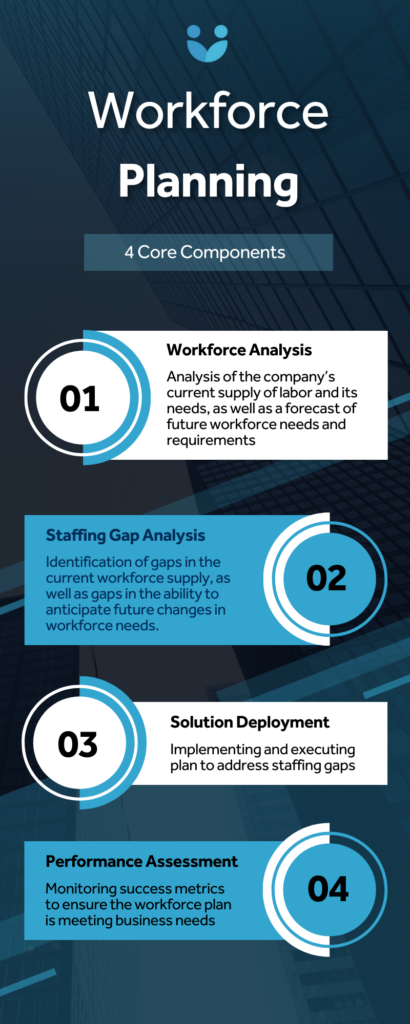
Infographic of Workforce.com's four core components of workforce planning

Core components of workforce planning

While there is no standard “one size fits all” structure for the workforce planning process, below are some key elements of most plans, including some supplementary components that can and will work better for some companies than others.

The most common parts of a workforce planning model are:

  • Workforce Analysis: Analysis of the company’s current supply of labor and its needs, as well as a forecast of future workforce needs and requirements
  • Staffing Gap Analysis: Identification of gaps between the current workforce supply and demand, as well as gaps in the company’s present ability to anticipate future changes in workforce needs.
  • Solution Deployment: Implementing and executing a plan to address staffing gaps
  • Performance Assessment: Monitoring success metrics to ensure the workforce plan is meeting business needs

Being prepared is better than being surprised

If a company is more efficient, it can avoid the need for layoffs or panic hiring. By planning ahead, HR can provide managers with the right number of people, with the right skills, in the right place, and at the right time. Workforce planning might be more accurately called talent planning because it integrates the forecasting elements of each of the HR functions that relate to talent management–recruiting, retention, redeployment, and leadership and employee development.

Businesspeople who just wait and then attempt to react to current events will not thrive for very long. The new standard is to provide managers with warnings and action plans to combat full-blown problems before they become more than a blip on their radar.

The human resource management world is no different.

The rate of change in the talent market is dramatic. We now know how important talent is to the success of a business. It’s time to make the talent pipeline more efficient.

Many of the other overhead functions–like procurement, manufacturing, and even the mailroom–have developed effective “pipelines.” If human resources cannot develop effective pipelines, then the alternative option is to have its entire function outsourced to an external vendor.

HR should be aware of the business cycle

HR professionals often face the painful boom-and-bust cycle of budget cuts, rapid growth, and more budget cuts. What they want is stability. Unfortunately, the way that some HR people act or fail to act compounds the pain of the boom or bust phases.

Everyone knows that the business cycle has ups and downs. There are phases of growth and phases of recession; each seems to happen every few years. The surprising thing is that HR, rather than preparing customized approaches for the different phases of the business cycle, tends to do things the same way no matter what the economic climate, operating independently of the business cycle.

The main reason that HR suffers through these phases is that it has no business strategy or plan to participate in its company’s business cycle. Rather than seeing the big picture and setting a strategic direction, HR departments sometimes tend to coddiwomple with temporary programs that only address crises in the moment.

HR should have two distinct reasons for planning ahead. The first reason is to lessen the impact of the boom-and-bust cycle on the management and operation of the HR department itself. The second–and perhaps more important–reason for planning ahead is that HR manages the new hire pipeline for the organization. It’s crucial to maintain both that pipeline and the talent inventory at the right levels.

This is where workforce planning strategy comes in.

A closer look at workforce planning

To better prepare a company to handle current and future staffing needs, human resources should generally follow the four-step workforce planning process listed earlier in this article. Here is a closer look at what each of those steps entails:

1. Workforce Analysis

This first step in workforce planning involves assessing both the current state of your company’s workforce as well as its ability to address future changes in staffing needs. Additionally, it is also important here to analyze the current external labor market, company revenues, expenses, and growth opportunities.

There are three primary areas of the Workforce Analysis:

  • Current labor supply & demand: checking the supply of labor the company currently has available, as well as the level of labor it currently demands.
  • Forecast of future workforce needs: taking initiative on discovering what external and internal variables could impact workforce needs, and understanding where the company will need to be agile in the future to ensure staffing levels are always correct
  • Skills and interest inventory: Identifying current and required job and competency needs as well employee skill sets.

From the workforce analysis, you should uncover a deeper understanding of your company’s current staffing situation, including its strengths, shortcomings, opportunities, and threats.

2. Staffing Gap Analysis

In this step, you take the information gathered from the workforce analysis and use it to pinpoint the talent gap between the company’s overall staffing needs and the identifiable supply of labor.

There are three parts to the staffing gap analysis:

  • Surplus/shortage determination: Reviewing the current supply and demand of labor, as well as current and future workforce needs, and determining the presence of either a surplus or shortage of labor.
  • Potential retirements: Figuring out the demographic of who is eligible, when they are eligible, who will replace them, and what alternative work arrangements are available that could prevent vacancy issues stemming from retirements.
  • Talent action plan: Outline what specific actions all (HR or otherwise) managers will have to take in terms of talent management. The action plan designates responsibility and outlines the specific steps that should be taken in order to fill the talent pipeline, address skill gaps, and maintain the talent inventory at the levels required for the firm’s projected growth rate.Each action plan has a set of goals, an individual who is responsible for making sure the plan objectives are met, a budget, a timetable, and a measurable result.

3. Solution Deployment

This is where everything comes together. Once the workforce analysis is complete, gaps are determined, and a talent action plan is made, a solution is determined and then executed.

Deploying a workforce plan is not a once-and-done situation. It is an ongoing process built on agility and continuous improvement. Once current staffing gaps are filled and the overall workforce is strengthened, the deployment continues in the form of adjusting and adapting to changes in future needs.

Here are some of the main areas of solution deployment:

  • Succession planning: Designating the progression plan for key positions.
  • Leadership development: Designating high-potential employees; coaching; mentoring; rotating people into different projects.
  • Talent recruiting: Estimating headcount, positions, location, timing, and more for new employees.
  • Talent retention: Forecasting turnover rates; identifying current employees who are at risk and how to keep them.
  • Redeployment: Deciding who is eligible for redeployment, and from where to where.
  • Contingent workforce: Designating the percentage of employees who will be contingent, and in what positions
  • Career path: Career counseling for employees to help them move up.
  • Backfills: Designating key-position backups.
  • Internal placement: Developing job-posting systems for internal employees to get a leg up on new openings.
  • Outsourcing: Determining business functions that would be better accomplished by labor outside of the organization
  • Contractors and consultants: Determining what new business requirements would be best met by specialized workers or consultants

4. Performance Assessment

Finally, the last step of a workforce plan is performance assessment. Again, this is an ongoing process, alongside solution deployment, in which select members of your organization monitor predetermined workforce success metrics to make sure strategic objectives are being met. These metrics should speak to if the workforce plan is actually benefiting the organization at all, and should indicate if the plan was flawed to begin with or if it is not being executed properly.

The future of workforce planning

Putting together an abstract workforce plan is one thing. Executing it across your entire workforce is another. Managers need the right tools and systems in place to monitor staffing levels, productivity, labor costs, and more.

While workforce planning has been around for a long time and has gone through many changes and multiple iterations, one thing is for certain: it is getting much easier.

Thanks to modern advances in workforce management software technology, workforce planning is becoming easier to visualize, deploy, and actively monitor.

Benefits of workforce management software

In order to execute effective workforce planning and achieve your business goals, HR leaders need a whole host of software solutions at their disposal. Chief among these is obviously HR software for talent and performance management. But other solutions are also required, including workforce management and labor forecasting software, both of which are extremely important to workforce planning.

Here are some of the ways workforce management and labor forecasting can streamline your workforce planning:

Everything on a single system

Nearly all the workforce planning data you need is housed in workforce management software. From time clock and scheduling data to employee records like pay rate and ob titles, everything is held in a single, cloud-based system optimized for easy access.

More visibility into labor costs

By combining scheduling and time tracking into a single system, workforce management software allows managers to leverage real-time data on labor costs. They can view costs per team, individual, week, or location to better understand where and how they are spending money on talent. Moreover, managers can view potential wage costs on schedules, and compare scheduled costs with actual costs on timesheets to pinpoint overspending.

Increased user self-service

Onboarding and retaining employees is critical to workforce planning. With workforce management software, employee self-service is maximized – users have access to a simple system to view schedules, request leave, pick up and swap shifts, clock in and out, and approve timesheets.

Easy insight into labor needs

The right labor forecasting software optimizes your workforce planning with AI and machine learning. It predicts demand and automatically matches labor ratios to that demand, making it easy to determine shortcomings in your supply of human capital. Clearly seeing where you lack the staff necessary to fulfill labor forecasts helps you hire more purposefully moving forward.

Comprehensive BI reporting

Managers can generate reports on historical wage costs, employee engagement, absenteeism, overtime, and more. These reports can be filtered by team, location, or job title, providing more clarity for managers when they are analyzing workforce trends.

Ensure labor compliance

Upon deploying a workforce plan, it is important to make sure your organization is complying with all necessary labor laws. It is particularly easy to misclassify contract workers, owe back pay, or violate various provisions of the Fair Labor Standards Act. Avoid all these issues when deploying your workforce plan with labor compliance software that schedules and pays employees accurately with the help of an extensive Wage & Hour Compliance library.

Optimize your workforce planning with Workforce.com

As a best-in-class workforce management platform, workforce planning is what we do. To learn more about how to streamline your business objectives with market-leading scheduling, compliance, and time tracking software, contact us today or sign up for a free trial.


FAQs

  • What is workforce planning?
    • It is a proactive and systematic process that involves analyzing the current supply of talent in your workforce, identifying gaps in your labor supply, forecasting future staffing needs, and developing shift plans to close gaps and meet budgets to avoid potential shortages and surpluses of human capital.
  • Who does workforce planning?
    • It is a collaborative effort between managers in multiple departments with a range of specialties since organizational alignment is important. Typically, HR and operations are most heavily involved.
  • Why is workforce planning important?
    • It is important for preventing over and understaffing as well as for building agility into a company’s talent management, retirement, and succession planning processes.
  • What tool do I use for workforce planning?
    • Typically you’ll need a robust HRIS system integrated with a specialized workforce management platform. The HRIS system should feature talent management, acquisition, onboarding, and payroll, while the workforce management platform should provide scheduling, time and attendance, and labor compliance.
  • How does workforce management software help with workforce planning?
    • Workforce management software helps managers execute and monitor the success of workforce planning. It allows businesses to schedule and track time accurately and compliantly. It also lets them view reports on labor costs, attendance, and engagement, which are all vital for keeping a business agile in its ability to forecast and react to changes in workforce needs.
  • Is workforce planning difficult?
    • No! Workforce planning generally involves four core steps and is continuously improved as businesses move forward. With the help of various software solutions, workforce planning is simple yet very rewarding.
  • How is workforce planning different from talent acquisition?
    • Talent acquisition is simply a small function of HR involving the identification and acquisition of workers for your company. Workforce planning is much broader, involving assessments of current talent supply, future talent supply needs, gaps in labor, and much more.


Posted on November 22, 2021

How the Lake Elsinore Storm’s HR manager improved staff engagement

In Lake Elsinore, California, baseball does more than simply entertain the local community – it also gives people the opportunity to chase their dreams. 

“I’m a big sports fan,” says a beaming Katie Strehlow, the HR manager for the Lake Elsinore Storm. “Once I graduated, I knew it would make a lot of sense to go work for a sports team because it’s something I’m interested in, something I’m passionate about.”

This passion is something she hopes to pass along to the 200 staff members she assists daily at the Storm’s stadium. A minor league affiliate of the San Diego Padres, the Lake Elsinore Storm draw over 6,000 fans for every game. It takes careful coordination and execution to make sure all staff members perform their tasks up to customer standards. Together, they pursue a common dream: to bring to life one of the world’s most beautiful sporting atmospheres. 


CHALLENGE

While games unfold on the field and fans roar in the stands, Strehlow has her hands full behind the scenes making sure all staff members are engaged and productive. In the stadium, she oversees the success of a wide range of employee initiatives, including concessions, ticketing, and the grounds crew. 

“Everyone on our staff is essential to ensuring a good experience for our fans,” says Strehlow. “Everyone is important because every piece contributes to the bigger picture.”

To satisfy fans and achieve the bigger picture, Strehlow strives to keep her employees engaged and fulfilled in their work. For a long time, this required excessive paperwork and constant grappling with a disorganized workforce management system. Employee engagement was suffering as a result.

“Employee engagement is really important,” says Strehlow. “We need to make sure that our employees are happy so that they want to continue working here. So I do my best to communicate with the employees, make sure that they know me.”

Strehlow knew the team’s attendance and scheduling capabilities needed to be updated. She needed the ability to actively track where staff were during games, as well as more tools for staff communication and feedback. She also required access to metrics that would help her pinpoint where burnout or lack of engagement was occurring. 

“We want to make sure that our employees are working the appropriate amount of time so that they don’t get tired. Especially in this type of environment,” says Strehlow. “There’s a lot of moving parts … if employees aren’t up to their peak, they might perform badly.”


SOLUTION

All of Strehlow’s staff were brought into Workforce.com, making it easier for her to organize and engage with them on a daily basis. The updated system eliminated time spent on manual data entry, allowing Strehlow to focus on improving employee engagement and performance. She can quickly schedule staff, check their attendance, and view engagement metrics on the go as she runs throughout the stadium during games. 

“I use Workforce.com every single day, basically constantly,” says Strehlow. “I am always checking on schedules, making sure that we have the right people in the right places … as someone in HR, it is very helpful to have all of that live data right in my hand.”


RESULTS

By overhauling the fundamentals of their workforce management system, the Lake Elsinore Storm succeeded in bolstering both customer satisfaction and employee engagement. Here are some of the ways in which Strehlow and the team as a whole experienced success:

Visibility into employee experience

Staff use Workforce.com’s feedback tool to rate and review their shifts. “I definitely read all of those through very carefully to find out what we’re doing well, what we can improve on,” says Strehlow. Consistently receiving feedback on shifts helps her identify engagement problems early before they become major issues.

“I prefer getting feedback every day from employees so that I know that we don’t have problems that are brewing … if there’s a minor fix that I can take care of that day or maybe that week, I know that we’re better set up down the road.”

Increased customer engagement

Perhaps most importantly, the Lake Elsinore Storm are experiencing a major boost in sales following their partnership with Workforce.com. In 2019, every fan on average spent between $24-$25 per game between parking, ticketing, retail, and food and beverage. That figure has since doubled, with the average fan now spending $47-$48 at games. 

Less time spent on administrative tasks

With all her staff operating on Workforce.com, Strehlow no longer finds herself chained to her desk slaving away at time-consuming administrative tasks. “You’re more likely to find me out interacting with the staff where they’re working. Being able to use my phone to check on things as I’m going is very helpful and makes a big difference.”

The software handles all timekeeping and scheduling matters, allowing Strehlow to engage with her staff in person while keeping an eye and a finger on things right from her phone.

Simple shift replacement

With Workforce.com’s shift replacement tool, Strehlow and her staff can post open shifts that need to be claimed. When an employee requests to take the shift, all Strehlow needs to do is tap her finger to approve the replacement. “I can go with, see who’s not available for a shift and who is available to pick it up and don’t have to worry about reaching out to people. It’s all right there.”

Best of all, the functionality significantly increases staff engagement and motivation. “I know that if somebody selects a shift that they’re actually going to be here and do a good job because they made that decision to come into work that day,” Strehlow says. 

Straightforward adoption

Onboarding staff to the new system proved tremendously easy, requiring very little time and effort in getting people comfortable using the array of user-friendly tools. 

“They were excited to use an app. They jumped on it right away, download it and use it daily now. So, it was easy,” says Strehlow. 


The Lake Elsinore Storm are knocking it out of the park now with fan experience, and it all comes back to how Strehlow brings the best out of her staff.

“I need them to be energetic and enthusiastic so that they can help make the fans energetic and enthusiastic,” she says. “That actually can affect the performance on the field.”

For Strehlow and the Storm, a winning culture on the field requires a winning culture in the workplace. Going forward, the team will continue to inspire productivity and passion in their sports-loving staff thanks to their mastery of workforce management.

Posted on September 9, 2021October 31, 2023

8 Pros & Cons of Biometric Time Clocks

xYou arrive for work, walk up to the door and look into the scanner. Infra-red light maps the unique patterns of your retina and, in the literal blink of an eye, your presence is verified, logged, and the door unlocks. This scenario used to be limited to high-security government installations and blockbuster spy movies, but the use of biometrics such as fingerprints and retinal scans to access everyday workplaces is fast becoming the norm.

In a 2019 study, more than a quarter of small North American businesses were using thumbprint scanners as a way of confirming identity, a number that leaps to over 40% for companies with more than 1,000 employees. Even retinal scanners, with their lingering science-fiction reputation, are being used by more than 10% of companies.

Biometrics is a rapidly evolving technology, and if you are considering investing in a biometric time clock system for your business, there are some pros and cons to weigh before making a decision.

The benefits of a biometric time clock

Biometrics offers considerable advantages over analog time clock systems such as punch cards or keycards, and it can improve accuracy, efficiency, and security across your locations.

Biometrics eliminates “buddy punching”

The biggest advantage from a company perspective is that biometric time clocks only work for the employee in question. This makes the common fraudulent practice of “buddy punching,” in which shift workers clock in and out for each other, all but impossible. Whether using fingerprints, palm prints, or retinal scans, biometrics requires the relevant person to be physically present. The only way to clock in for an absent colleague using this system would be to have their eyeballs or fingers, and there aren’t many work buddies willing to go that far to shave a few hours of their working day!

Biometrics improves on-site security

This also means an increase in security and safety. You can be sure that the person gaining access to your premises under a biometric system is who they say they are. It isn’t foolproof—employees can still hold the door open and allow others access—but the chances of anyone using a lost or stolen keycode or card to enter your workplace is gone.

Biometrics streamlines shift changes

Biometric time clocks can also increase efficiency in several areas. Employees don’t need to remember passcodes or keep track of a physical key card, which means your company doesn’t need to spend time and resources providing and managing those measures. The shift change process can also be sped up, as employees can clock in and out more quickly without typing in codes or fumbling in wallets for cards, reducing time-wasting bottlenecks.

Connecting biometric time clock systems to time and attendance software has advantages for employees, too. Being able to prove beyond doubt that they were on-site at specific times means that claims for unpaid overtime are much easier to prove. That, in turn, gives your managers the tools to ensure that payroll is correct, reducing the risk of wage and hour lawsuits.


The potential pitfalls of a biometric time clock

Biometrics is still an evolving technology, and it may still produce practical and legal hurdles for businesses to handle. If you introduce a biometric time clock now, you will need to consider a new range of accessibility issues as well as taking on additional data admin work with the possibility of further changes in the future.

Biometrics can limit access for disabled employees

Where employees with disabilities are concerned, companies should be especially alert to their practical access needs. If an eye-level retinal scanner is used to access the workplace, how will that impact wheelchair users? If access is via a palm or fingerprint reader, how will employees with limited or no visibility know where to place their hands? The Americans with Disabilities Act requires companies to make all reasonable accommodations for people with disabilities to access premises, even just for job interviews. While there have been exploratory studies raising concern on this issue, there has yet to be a test case involving biometrics. You don’t want your company to be the one setting that precedent.

Biometrics can require new data handling systems

Data privacy is already something companies need to be on top of, and the use of biometrics will only increase that burden. Although there is no federal law governing the use and storage of biometric data, several states have enacted their own, and it is only a matter of time before others follow suit. Texas and Washington have laws governing general biometric data use, while New York has labor legislation that covers it specifically for workplaces. Passed in 2008, the Illinois Biometric Information Privacy Act (BIPA) is the leading template for this kind of legislation, so it is useful to be familiar with what it requires from employers.

Under BIPA, companies must have a publicly available written policy that lays out how biometric data will be used, stored, and deleted. Employees must be sent written confirmation that their biometrics are being collected and how long they will be stored. Employees must also give written consent for this to happen and give separate consent for this data to be shared with third parties. Employee biometric data must be safeguarded and should not be used for profit-making.

Biometric data law violations are costly

As of 2018, more than 50 companies were facing lawsuits filed under BIPA with penalties that can quickly stack up—$1,000 per violation caused by negligence, such as inadequate data security, and $5,000 for every deliberate infraction, such as selling the data to third parties. There have been some high-profile results. Early in 2021, Walmart was hit with a $10 million settlement following a BIPA class-action suit involving 21,677 employees who used a palm scanner when handling cash register drawers without being asked for consent.

In another 2018 case, Smith Senior Living settled a lawsuit brought by an employee who was not made aware that her fingerprint data used to clock in and out of shifts was being stored in a database by Kronos Inc., the external supplier of the biometric systems. Any biometric time clock that shares data with an external platform—such as time and attendance software—means you should get explicit consent from employees to avoid legal exposure.


Biometric time clocks require companies to earn trust

Since biometric data is uniquely personal, it stands to reason that people will see the collection and use of that data in more personal terms. As an employer introducing biometric time clocks, the onus will be on you to build trust and put systems in place that reassure your staff you can be trusted with this information.

Legal challenges such as the one Walmart faced are likely the thin end of the wedge when it comes to concern from the general public over the use of biometrics. A 2018 survey found that 69% of respondents felt there were strong arguments against biometrics, with worries about the data itself being the most common.

A case was brought against Honeywell in 2015 for encouraging employees to sign up for a wellness program that included biometric screening in order to qualify for health insurance. The tests included cholesterol, waist size, and smoking history. Those who opted not to take part risked thousands of dollars in penalties and lost contributions. The Equal Employment Opportunity Commission (EEOC) filed the suit saying it violated the Americans with Disabilities Act and the Genetic Information Nondiscrimination Act by forcing employees with disabilities to reveal medical information for purposes not required by their work.

Although the Honeywell case was not related to biometric time clocks, it is inevitable that some employees will see any introduction of biometrics into the workplace as a prelude to punitive personal scrutiny. These are paranoid times, especially where matters of health and privacy are concerned, and some may even assume that their data will be misused regardless. It’s up to you to convince them this isn’t the case.


Biometric time clocks aren’t vital for every business—yet

Although the use of biometric time clocks is growing, with the pandemic driving takeup of contact-free retinal scanners in particular, that doesn’t mean it’s the right call for every business to adopt this technology. Biometric time clocks are especially useful for businesses that rely on hourly shift workers. Keeping track of lots of staff coming and going, without causing bottlenecks as people clock in and out, is a boon to companies operating on that model. Producing accurate data for payroll and efficient staff management is another bonus.

This is also a system that can be implemented gradually, used for access to specific locations that need additional layers of security or accountability. Or it may not be right for your business at all, right now. Biometrics in the workplace, whether for time clock purposes or other reasons, requires the introduction of new data security systems and the additional admin load of handling employee consent and the deletion of data when staff leave. Add in the still-evolving legislative landscape where biometric data is concerned, and adopting a “wait and see” approach is a valid strategy.

Whatever you choose, this is a technology that managers need to be familiar with as it appears in more everyday workplaces and will no doubt play a much larger role in the future. For those who do invest in biometric time clocks now, be assured that Workforce’s time and attendance software will integrate with your new system for a complete and secure solution.

Posted on July 27, 2021July 5, 2023

Shift bids vs shift swaps – which is right for your business?

Being flexible with shift work is good for business. Even before the pandemic created a nationwide staffing shortage, employees were making it clear that a better work/life balance was becoming a top priority.

A 2019 survey (https://www.prnewswire.com/news-releases/new-research-shows-that-flexible-working-is-now-a-top-consideration-in-the-war-for-talent-300818790.html) by IWG found that 80% of workers would choose a job with a flexible schedule over one that did not, and more than 30% considered flexibility more important than extra vacation days or a prestigious job title. In addition, a different survey (https://www.flexjobs.com/blog/post/survey-flexible-work-job-choices/) in the same year found 80% of workers would be more loyal to their employer if they had more flexibility over when they worked, with over half trying to negotiate adding this perk with their current manager.

There are two popular ways to inject flexibility into your shift scheduling: shift bids and shift swaps. While they appear similar, they differ in subtle but important ways, and the right one for you will depend on the specifics of your business.

Shift bids and shift swaps – what’s the difference?

Put simply, shift bids are when the manager invites workers to put themselves forward for open shifts. Shift swaps allow workers to arrange to take each other’s shifts directly.

Shift bid example: A retail worker informs the manager that they can’t come in as scheduled on Friday because of a medical appointment. The manager chooses which staff members are best suited to fill that shift and lets them know an extra shift is up for grabs. The manager then chooses who will take the shift from those that express an interest.

Shift swap example: A restaurant worker has a childcare emergency and can’t come in for their scheduled afternoon shift, so they ask their colleague to swap shifts. The colleague agrees, and they present the solution to their manager, who approves it.

Each approach has the desired result: the empty shift is filled. Both are also easily implemented with the right scheduling software, but which method works best for your business depends on several factors.


Shift bids keep the manager in control

There are benefits and limitations to shift bids that you should be aware of before considering using them.

Benefits of shift bids

  • The manager gets a choice of different staff members to fill a shift and can pick the best suited. This helps maintain a well-rounded shift with employees who possess all the required skills and experience and work well together.
  • Managers using shift bids may also keep an eye on who is close to working overtime and favor those with fewer hours on the clock, thus controlling costs and spreading available work more evenly.
  • A shift bids system can expand to fill all shifts, not just absences. Workers can rank all available shifts according to their preference, and the manager can use that data to put together a schedule that accommodates as many people as possible.
  • Staff using shift bids have more control over when they work by only putting themselves forward for shifts that fit around their life.

Limitations of shift bids

  • The shift bids approach won’t suit every worker, and some can find the need to bid for their shifts to be stressful.
  • Shift bids can be prone to favoritism and need to be carefully monitored to ensure bids are being handled fairly. This is an area where scheduling software can help, as you can easily check your shift data over time and identify patterns where certain staff members are scheduled – or not – more than others.

Shift swaps can be quick and painless

Shift swaps are simpler to manage than shift bids, but have other pros and cons worth considering.

Benefits of shift swaps

  • By having staff arrange coverage between themselves, shift swaps save the manager’s time.
  • With reliable staff, shift swaps can solve many scheduling issues before they even become a problem.
  • Shift swaps are better suited to solving urgent staffing needs, such as last-minute absences, as they don’t require employees to go through the bidding process.

Limitations of shift swaps

  • The manager has less control over who takes a shift, so unbalanced staff rosters are a risk.
  • Unregulated shift swaps can be prone to over-use by employees and require a robust company policy to clarify the conditions under which shift swaps will be approved.

Choosing the right approach for your company

The scheduling method best suited to your company will depends on several factors.

Company culture

In environments where top-down management is the norm, shift bids are likely to be a better fit. But in businesses where employees are used to having greater autonomy, they’ll likely prefer to arrange shift swaps themselves.

Company size

The larger the company, the more effective shift bidding becomes, as having more staff available to bid on shifts means more choice for managers. And vice versa; the fewer staff members there are, the fewer variables the manager has to keep track of when shifts are swapped.

Worker and managerial experience

A shift swap system works well for companies or locations with reliable long-term staff. For that reason, shift swaps can also benefit new managers or managers who are unfamiliar with all the employees, as it means there is less need to match workers to shifts personally.

All these factors are prone to change over time, but resist the temptation to mix and match shift bids and shift swaps at the same time. Instead, it is better to pick one flexible scheduling system and stick with it for clarity for staff and simplicity for managers.

Flexible shifts help attract and retain staff, and whichever way you approach them will require well-thought-out processes. However, if the practical complexities still seem intimidating, remember that scheduling solutions such as Workforce.com can help automate and track shift bids and shift swaps, freeing up valuable time and headspace for managers.

Posted on July 27, 2021August 3, 2023

The 10-minute guide to 2021 labor law compliance

Labor laws are a potentially lethal minefield for companies, particularly in today’s turbulent labor market, as the cost of labor law compliance failures can be enormous.

Labor law fines tend to stack per infraction so with large employee numbers the financial risk can grow exponentially, as with the recent high profile example of New York City suing Chipotle (https://edition.cnn.com/2021/04/29/business/chipotle-nyc-lawsuit-labor-law/index.html) for $151 million over 600,000 labor law violations accumulated within the city. In Tennessee, a home health care provider misclassified fifty workers as independent contractors rather than employees and was hit with a $358k penalty (https://www.workforce.com/news/worker-misclassification)by the Department of Labor to make up back wages and overtime.

Ignorance of the law is no defense, so even in situations where labor law compliance is complicated by different federal, state, and city rulings, it’s up to companies to stay on top of what is required. In situations where federal and local laws differ (i.e., the state minimum wage is higher than the federal), companies are expected to adhere to whichever is most stringent (i.e., they would have to pay the higher state minimum wage, not the federal).

It’s all too easy to make labor law compliance mistakes, but awareness of your responsibilities and impeccable record keeping will help to protect your company. Here are the key areas to keep in mind.

Minimum wage

Minimum wage laws are getting a lot of attention at the moment, with President Biden’s executive order raising the salary for federal workers to at least $15 per hour being seen by many as a prelude to a nationwide rise in minimum wage levels. Compliance with these laws can seem cut and dried, but there are aspects unique to some industries that you should be aware of if they affect you.

For example, industries where workers earn tips have a unique minimum wage law to follow, called Minimum Tipped Wage. “Minimum tipped wage makes it quite a bit more complicated,” says Workforce’s chief strategy officer Josh Cameron. “In hospitality or anything where you earn tips, you can pay the staff a minimum wage much lower than the normal one. So it would be $7.50 an hour if they’re not tipped, but it’s $2.50 if it’s tipped. As long as they get enough tips to get them over that—it’s called the tip credit—then they can receive the lower $2.50 per hour from their employer.”

There are reasons to keep on top of minimum wage laws beyond the threat of fines. For example, 29 states currently require a minimum wage higher than the federal standard, and you are obliged to pay the higher sum. Underpaid workers are unlikely to show any loyalty to a company, and underpayment can cause PR problems as well. “An underpayment scandal can bring companies to their knees,” says Andrew Stirling, head of product compliance at Workforce.com. “Customers can decide to take their business elsewhere. People are less likely to visit a restaurant or shop that has been reported for underpaying their people.”

Paid and unpaid breaks

One of the areas of labor law compliance with the least clarity is breaks for workers, making it especially important for companies to err on the side of caution. The legal requirements can be found on the Department of Labor website, but there are significant areas of ambiguity to watch for:

  • Federal law does not require companies to offer lunch or coffee breaks.
  • Where short breaks are allowed by a company, short breaks (i.e., toilet use) of up to 20 minutes should be paid.
  • Breaks of 30 minutes or longer (i.e., lunch) are considered outside of workable hours and do not need to be paid.
  • Waiting time or on-call time does not count as a break and should be paid.

“There’s this gray area,” says Josh Cameron. “Say you take a break for 21 minutes, is that paid or unpaid? Is it okay to make that unpaid? If you’re a lawyer looking at this, it’s really an opportunity because you can say, ‘This employee always had a 23-minute break, always had an 18-minute break, and they never got paid for it. Maybe they should have been.’ That’s something that employers should really be aware of and keep an eye on.”

This is an area where accurate and exhaustive employee data can really help, and if your company still relies on timecards and manual spreadsheets or pen and paper logs to track breaks, you could be leaving yourself open to big problems in the future.

Paid and unpaid leave

Thirteen states, plus Washington DC, currently require private companies to offer paid sick leave. The Families First Coronavirus Response Act added an additional responsibility for companies with less than 500 employees to allow workers to take paid time off if infected with COVID-19, to isolate following contact with an infected person, or to care for a family member. The same act also introduced a tax credit to offset the loss for affected companies.

California, New Jersey, Rhode Island, and Washington have all passed laws that also require paid family leave, and President Biden’s administration has set its sights on a federally mandated period of 12-weeks paid leave that would allow, for example, parents to take time off to care for newborn babies or other family needs.

For now, the only federal law involving medical and family leave is the Family and Medical Leave Act, which requires employers with more than 50 staff to offer 12 workweeks of unpaid, job-protected leave in a 12-month period for:

  • The birth of a child, adoption, or fostering of a child
  • A seriously ill spouse, child, or parent
  • A serious health condition that makes the employee unable to perform the essential functions of his or her job
  • Any qualifying exigency arising out of the fact that the employee’s spouse, son, daughter, or parent is a covered military member on “covered active duty;” or Military Caregiver Leave—26 weeks in a 12-month period to care for an injured or seriously ill spouse, son or daughter, parent, or other next of kin who is a covered service member

This is an area of labor law compliance that is only going to become more prominent in the coming years, so shrewd managers should ensure they are on top of current requirements, which are largely dependent on where you operate and how many staff you have, and be prepared for change.

Healthcare

Another area of labor law that has been fraught with political debate, the Affordable Care Act requires that if an employee works more than 30 hours a week over any single year look-back period, then the employer must provide health insurance. While the ACA is a federal law, the portion of the medical insurance that the employer has to pay is determined by the state. In New York, for example, the employer must pay 80%.

The 30 hours a week cut-off requires particularly careful management where shift workers are concerned, as their hours may fluctuate over time. “This whole area is a big pain point,” explains Josh Cameron. “It’s a very difficult conversation to have with an employee that has become eligible for healthcare, then loses that eligibility the next year. Taking it away from someone feels very harsh to the employee.”

Keeping track of employee hours and keeping accurate records is yet again a vital part of compliance for companies here. Qualifying for healthcare is a strong motivator for retaining staff, but for those companies that are concerned about shouldering the additional costs, Workforce.com can be calibrated to warn managers when employees reach the 30 hours threshold and can even prevent managers from publishing schedules that extend past 30 hours.

Predictive scheduling

A recent addition to the labor law conversation, predictive scheduling laws – also sometimes known as “fair workweek” – place restrictions on how shifts are assigned and require companies to give advance notice of new schedules.

Two states – Vermont and Oregon – and eight municipalities – San Francisco, Berkeley, Emeryville, San Jose, Seattle, New York City, Chicago, and Philadelphia – have passed such laws, and more states and cities are considering legislation in this area. The specifics of the laws vary from region to region, but the core principles are:

  • A minimum notice period for upcoming schedules (usually two weeks) with compensation for workers who are not given enough notice of their schedule or changes to that schedule
  • A ban on “clopening,” meaning that a staff member working the closing shift cannot be scheduled to work the opening shift the next day
  • Mandatory rest periods that vary from between 9 to 11 hours between shifts

Failing to maintain compliance with these laws is expensive. The Chipotle example mentioned earlier, in which NYC sued the fast-food chain for $151 million, was caused by hundreds of thousands of predictive scheduling infractions across its many locations in the city.

Even if your business is not based in a state or city with predictive scheduling laws, it is still worth adopting the principles behind them. Partly because these laws may yet impact your business, but also because they have had a notable improvement on staff retention and job satisfaction.

Discrimination laws

There are thankfully few employers looking to openly discriminate in their hiring processes these days, but you should still be aware of which groups the law applies to when hiring and firing, as well as setting the terms of employment and how much people are paid.

  • The Equal Opportunity in Employment Act covers all the areas of discrimination that are forbidden. This concise PDF from the Department of Labor spells out everything employers should know.
  • The Americans with Disabilities Act (ADA) applies to companies with 15 or more employees and makes it illegal to discriminate in employment on the basis of a person’s disability. This also requires companies to make “reasonable accommodation” to allow a disabled person to work there, including making modifications to the working environment to not only allow disabled people to work there but also participate in the application process.
  • Ever since the Civil Rights Act of 1964, there have been several laws and amendments which make it illegal to discriminate against anyone because of their Ethnicity, Gender, Race, or Religion. Nationality is also a protected category, so, for example, it would be illegal not to hire someone because they were from Poland, regardless of their race or ethnicity.
  • The Age Discrimination in Employment Act offers protection to employees and applicants on the basis of their age. This law applies to anyone aged 40 or older, a far younger cut-off than many companies realize.

Labor law compliance is easier with good record keeping

If this all seems like a lot to keep track of, you’re not alone. The USA has relatively light-touch regulations for businesses compared to Europe, for example, but that doesn’t mean the task of staying compliant with labor laws can’t feel overwhelming—especially if you’re new to management and dealing with all of this legislation for the first time.

Regardless of which law is involved, one of the recurring causes of labor law breaches is poor record keeping. There’s one surefire way to ensure that your labor law compliance is rock solid, and that’s to keep excellent data. While it’s possible to maintain your records the old-fashioned way, with paper and pen or spreadsheets, the potential for human error is high.

When the cost of non-compliance can be so steep, using dedicated staff management software like Workforce.com to track staff hours and automatically flag labor law compliance issues offers much-needed peace of mind.

Posted on July 26, 2021August 3, 2023

How to reduce labor costs and attract quality staff in a post-Covid market

The challenge of attracting quality staff while trying to reduce labor costs is one that has taken on fresh urgency in the post-Covid labor market. This is particularly true where hourly shift work is concerned, as staff question their priorities after a year in lockdown.

Thankfully, there are several ways to find – and retain – good workers while still controlling your labor costs. It just requires a little recalibration of how you think about incentives and staff management.

Use flexible working rather than salary incentives

One myth that we can dispel quickly is that the only way to attract quality staff is by offering larger salaries. That’s been the assumed wisdom for decades but is now an outdated view of what people want from a job.

Increasingly workers are saying that flexible working hours are now their priority, with multiple studies showing that the ability to fit work around other areas of their life is a key consideration when job hunting. One pre-pandemic study found that if given the option of a job with flexible hours and one without, 80% of workers would choose the job with flexible hours. The same study found that 30% considered flexible working more attractive than extra vacation days or a prestigious job title.

Offering flexible hours not makes your company more attractive to workers, but it makes staff more likely to stay with you for the long term. A survey for FlexJobs found that 80% of workers would be more loyal to their current job if it gave them more flexibility.

The reason for this is that the way we perceive value in work has changed. “If you’re a parent and you have three kids to pick up from school every day at 3:30, then flexible working actually adds a lot of value to you”, explains Josh Cameron, Workforce’s Chief Strategy Officer. “If you can pick or swap out of the shifts, that’s more important to you than getting an extra $2 an hour, because you have to pay someone to pick up and look after your kids. The extra dollars are not adding value.”

Systems such as shift bidding are an excellent way to incorporate flexibility into a business, help reduce labor costs by not adding additional expense on your payroll, and are easily managed using staff management software such as Workforce.com.

You don’t need to cut wages to reduce labor costs

It’s a mistake to think that the only way to reduce labor costs is to cut staff or lower wages. One of the best ways to save money is by getting more value for what you already spend, and one of the most common ways that businesses fail to do this is by losing track of productivity against wages.

You can save money in real terms by ensuring that hours worked and hours scheduled match up, cross-referencing with hourly income using workforce analytics to check you are getting the productivity you’re paying for. It may sound basic, but you’d be surprised how many companies still have their data spread across multiple files or systems and simply assume the numbers match at the end of each day.

“Most people never check the schedule matches what people actually work,” says Josh Cameron. “They might have a really good shift plan, and that’s in one system, but then the attendance data is in another system, and people are clocking in and clocking out of that. And the manager is basically just blindly ticking things because that’s what was clocked. If they even wanted to cross-check that, it would be a big exercise. People don’t do it. What’s much better is to have the schedule and the attendance in one system, so you can tick these things off throughout the day or at the end of the shift and if there are differences, you can go see why that happens.”

Listen to feedback to stop staff churn

Once you’ve attracted good workers with flexible hours and made sure you’re getting full value for those hours worked, it’s important to remember that you can help to reduce labor costs by keeping those staff in your business. Replacing employees costs money in advertising the vacant roles, onboarding and training, and lost productivity as working routines are disrupted. Gallup found in 2019 that US businesses lose a trillion dollars every year simply from the cost of replacing staff.

How do you stop staff from leaving? Listen to what’s bugging them about their job, and fix problems wherever possible. The idea of employers giving performance feedback to employees is widely accepted, but it’s also important for employees to be able to give feedback on the company.

“If you’re asking why people quit, by allowing people a way of giving feedback on their shifts, they feel ‘Hey, I have a way of being heard in this job, I actually am important,’” says Josh Cameron. “Managers can look at that feedback and analyze it and be like, ‘This is what’s causing problems. We’ve got these structural things that make it hard to work in this shift and that’s making it hard for people.’”

This is why Workforce.com allows staff to give feedback not just in general, but on the specific shifts they work. This allows managers to identify the pain points that cause staff to leave, and make changes. It may be something as common as a particular manager being hard to work with. It may be that a certain location gets uncomfortably hot on summer afternoons. Whether the answer means shuffling the staff roster, or something as easy as investing in an aircon unit, you’re empowered to spot the leaks in your staffing and plug them before they cost you any more revenue.

Think beyond the hiring process

There will always be sledgehammer approaches to reducing labor costs, but the current labor market conditions where potential employees are empowered to say “no” to jobs that don’t work for them, require a more nuanced approach. Companies save money when they hire the right people and get the best out of those people, and that means making sure they want to stay with you for the long term. From offering more flexible working arrangements to identifying the problems that drive staff away, Workforce.com can help at every stage.

Posted on July 15, 2021September 5, 2023

How to Calculate Time Cards Manually: Foolproof Step-by-Step Instructions

Calculating your employees’ time cards accurately is crucial to your business. Not only does it ensure you’re paying your employees the right amount, but it also helps you make sure you’re not scheduling anyone for too many or too few hours, and it allows you to understand what staffing levels your business needs to function at its best.

New small business owners may find that calculating time cards manually works well for them initially, especially if they have a small number of hourly employees and few work hours to track. Even more established businesses that are using Excel spreadsheets, timesheet calculators, or other time tracking methods for calculating hours should know how the math works. That way, even with a computer, you’ll be able to spot and correct any inevitable errors.

Once you understand how to do manual time card calculations, it’s also important to know what problems you may face with that method, such as how much time it takes and how easy it can be for employees to commit time theft. Then we’ll show you how time and attendance software can address those issues and make the entire process a breeze.

How to do the math for time cards by hand

Manually tracking employee hours by hand is an old method, but it works. Here’s how to do it.

Step 1

Convert an employee’s start and end hours for the day, as well as any unpaid break time, to 24-hour time, also known as military time.

For example, your employee began working at 9:22 a.m., took a lunch break from 12:30-1:15 p.m., and ended their day at 5:08 p.m. In a 24-hour time span, the hours past 12 p.m. must be converted, so 1:15 p.m. becomes 13:15, and 5:08 p.m. becomes 17:08.

Step 2

Convert the minutes into decimal format—instead of minutes out of 60, make them percentages of 100. To do this, you can either use a chart or simply divide the minutes by 60.

In our example, this means your employee’s clock-in and clock-out times become 09.37 and 12.50 for the first half of their shift and 13.25 and 17.13 for the second half of their shift.

Step 3

Subtract the employee’s shift start times from the end times.

12.50 – 09.37 = 03.13 and 17.13 – 13.25 = 03.88

Step 4

Add the working hours from step three together to get the total for the day.

03.13 + 03.88 = 07.01

So your employee worked a little over seven hours total.

Step 5

Repeat these steps for each day worked within the pay period, and add all the days together for the total hours the employee worked within the workweek. Multiply the total by their hourly rate to determine their gross pay before deductions.

Bonus Step

If an employee works overtime and is paid an overtime rate, you’ll want to calculate and note it separately to make sure they receive the correct overtime pay.


The issues with calculating time cards manually

While doing the math by hand works when calculating employee hours, there are also plenty of reasons to be wary of it, from the amount of time it takes to the ways it makes your business vulnerable to theft.

Storing physical time cards and keeping them secure

Calculating manual time cards requires either the manager or employees to keep accurate physical time cards, which can be damaged or destroyed. The time cards and the documents you use to calculate them must be stored securely, taking up office or storage space. Accessing these documents for auditing or other reasons can be difficult and time-consuming, particularly if the records aren’t kept in an organized manner.

Spending time doing calculations and Chasing information

You may not mind having to take the time to calculate time cards manually, but if you have more than a few employees, it’s going to take a while to do the calculations and complete your payroll duties.

If employee time cards are handwritten or if your time clock runs out of ink, there may be times recorded that are illegible, which means you need to spend time contacting employees or managers to figure out what the times are supposed to be. Correcting mistakes also takes extra time since you have to track down the physical timesheets and redo the math.

Risking the possibility of employee time theft

Time theft is easy for employees to commit when you use paper time cards or calculate time by hand, and it’s difficult for employers to track. Employees can commit time theft in a number of ways, such as by saying they worked more regular hours than they actually did, by clocking in and then not starting work for 20 minutes, or by having a friend at work clock them in when they aren’t there, so people don’t know they’re late.

This could also happen unintentionally. If an employee forgets their clock-in or clock-out times, you have to rely on their memory or on their manager or co-workers remembering the number of hours the employee worked, which could easily lead to inaccuracies that result in employees being overpaid or underpaid.

Leaving the door open for potential fraud

When you calculate your employees’ time cards manually, there’s more wiggle room for employers to commit fraud. This can happen accidentally, for example, if an employer loses track of the number of hours an employee worked or intentionally if a manager is skimming time off employees’ hours to stay in budget. Either way, shorting employees on their hours worked or overtime pay is wrong, and for companies, it can result in overtime rule violations, penalties, and fines.

Difficulty understanding the big picture

A general lack of oversight and control is another negative. When you need to check all your employees’ hours by hand, it’s hard to know who’s about to hit the max number of hours they can work, if you’re staying within your budget for staffing costs, or what the optimal staffing levels are. These are things you want to be able to know with a quick look.

How time and attendance software can solve the issues

By using a digital time and attendance solution, you can improve your business by ensuring employee time cards are accurate, secure, and easy.

electronically track and store time card information

With Workforce.com’s time and attendance software, there are no physical time cards or recordkeeping to track. Everything is done through the app, making accessing time card records simple. Because all the information is kept in a secure online system, you don’t have to worry about maintaining organized files in an office or fear they’ll get damaged.

Automate calculations and Clock-in/Clock-Out notifications

When your employees clock in with Workforce.com, they do so either on an app on their mobile device or on a tablet kept at their workplace. Notifications can prompt them when it’s time to clock in or clock out, and their hours are calculated automatically, so you never have to concern yourself with illegible handwritten time cards, employees forgetting to clock in or out, or having to calculate time cards by hand.

Protect against employee time theft and fraud

Workforce.com’s software’s electronic photo verification controls make it next to impossible for employees to have their co-workers punch in for them, and system controls can prevent employees from clocking in early themselves, reducing the possibility of employee time theft. Labor compliance reporting helps make sure employers are following labor laws, such as the Fair Labor Standards Act, to prevent fraud and protect your business.

The flexibility of Workforce.com’s software and mobile app helps you track your employees’ time easily from wherever you—or they—are. If your employees aren’t tied to a retail location, you can use GPS to track their location remotely, see if they’re on the job or somewhere they aren’t supposed to be, and set restrictions for clocking in or out on the job site.

Easy oversight from a computer or mobile device

With these tools, you can have detailed oversight of your employees’ digital time cards, whether you’re at your desk or on the move. Workforce.com’s platform allows you to easily see who’s nearing their maximum working hours for the week, who is nearing overtime hours, easily swap employee shifts should the need arise, and know at a glance what staffing levels are optimal.

Make tracking and calculating employee time cards easy

Time and attendance software takes the headache out of calculating time cards for your employees, resulting in more accurate payroll spending while making employee scheduling easier. Workforce.com has automatic systems in place to help you streamline your processes, save time, and protect your bottom line. Book your demo today.

Workforce.com is a leader in Employee Scheduling on G2

Posted on June 22, 2021October 7, 2021

Workplace things COVID has not changed: You can still fire dishonest employees

Suppose an employee leaves work claiming COVID-like symptoms. He then calls off work for the next two weeks, claiming he is quarantining at home at his doctor’s recommendation.

Can you fire the employee during that quarantine period? Does your opinion change if you learn during the quarantine that the employee’s doctor never recommended the quarantine and the employee lied about receiving that recommendation?

Those are the basic facts of O’Bryan v. Joe Taylor Restoration, and upon which a federal court jury in southern Florida recently entered a verdict in favor of the employer.

O’Bryan’s lawsuit claimed that his employer had denied him paid sick leave under the FFCRA during his quarantine and retaliated against him for seeking paid sick leave. The employer uncovered his dishonesty when it saw a discrepancy between the alleged note ordering the quarantine and a later note authorizing his return to work.
COVID has altered a lot about the workplace. Thankfully, however, the ability of an employer to fire a dishonest employee has not been one of them.
Posted on June 16, 2021October 18, 2024

Poor recordkeeping contributes to contractor paying $500K in back pay, fines after Labor Department probe, litigation

poor recordkeeping

A New York-based contractor agreed to pay 69 employees $500,000 in back wages and damages to resolve violations of the Fair Labor Standards Act’s overtime and recordkeeping requirements after being sued in federal court by the Department of Labor.

Investigators from the department’s Wage and Hour Division found that Maio Building Corp. and owner John Maio often directed laborers and masons to work 10-hour days, five or six days a week, knowing the FLSA required employees to receive overtime pay when they worked more than 40 hours per week. The company reached a settlement and was ordered by the U.S. District Court for the Eastern District of New York to pay $250,000 in back wages and an equal amount in liquidated damages, according to a Labor Department statement.

Clean up recordkeeping

Maio also paid employees in cash or a combination of check and cash and failed to keep accurate records of employees’ work hours and regular hourly rate of pay, according to the Labor Department statement.

Poor FLSA compliance and recordkeeping that lead to steep Labor Department fines is avoidable, said employment law attorney William J. Anthony, a partner at Blank Rome in New York. The FLSA permits any form of timekeeping system as long as it accurately records all hours worked, he said. 

Also read: How to schedule employees effectively: 5 proven steps

“Many employers use electronic timekeeping systems and payroll companies to help with compliance and avoid legal issues,” he said.

Enforce your time and attendance policies

Sonya Rosenberg, a labor law attorney and partner with Neal Gerber in Chicago, added that it’s not enough to just have written policies. 

“You want to be sure they are consistently enforced and that there are established, working procedures in place for when any corrections need to be made,” she said. “Every organization needs to ensure that all of its employees, and particularly its frontline supervisors, managers and HR staff are well trained in wage and hour requirements.”

Employers must emphasize that accurate time tracking is an essential element of each employee’s job and that failure to adhere to the rules will result in discipline, said Kara Govro, senior legal analyst at HR consultancy Mineral (formerly ThinkHR and Mammoth). Make sure employees see and read the policy. Enforcing these policies is crucial.

“If you say you’re going to be serious about it, be serious about it,” Govro said. “Write employees up, issue final warnings and be prepared to terminate if you have employees who refuse to meet your clearly articulated expectations.”

Anthony cited four ways to clean up recordkeeping practices. 

  1. Publish a policy on how to accurately record time and how to report any payroll errors.
  2. Have employees certify that their weekly time records are accurate.
  3. Train new employees on proper timekeeping.
  4. Monitor the timekeeping and payroll systems regularly to ensure accuracy. 

Anthony also said that responsibility for accurate wage and hour recordkeeping typically falls on human resources or the in-house legal department to ensure compliance. In smaller organizations, it may be the owners or management personnel who are responsible, he said. 

“Under the FLSA, an employer includes individuals with decision-making authority and operational control over payroll and wage and hour practices,” he said.

The consent judgment is the outcome of a lawsuit filed by the Labor Department’s Office of the Solicitor. In addition to the payment of back wages and damages to the employees, the judgment prohibits Maio Building Corp. from:

  • Future violations of the FLSA’s overtime and recordkeeping requirements.
  • Taking retaliatory action against employees who exercise their FLSA rights.
  • Telling any of their employees not to speak with or provide untruthful information to Labor Department investigators.
  • Soliciting or accepting the return or kick back of the wages and damages from the affected employees.
  • Threatening or implying adverse action against any employees or former employees because of their receipt of funds due under the judgment or the FLSA.
  • Otherwise obstructing or interfering with any department investigative activities.

Maio denied the allegations and said the company acted in good faith and complied with the law, according to a June 7 Equipment World article. The response said the Labor Department’s claims were barred by the Federal Motor Carriers Act and that the division had denied Maio due process rights at the closing conference by “refusing to discuss the MCA exemption,” the article stated.

Stricter Labor Department enforcement

On April 30, 2021, a settlement agreement was filed with the court in which Maio neither admitted nor denied the allegations, but that the company agreed to the settlement “to avoid the burden and expense of litigation,” according to the article.

Given that the Labor Department under Secretary Marty Walsh is stepping up enforcement versus guidance, particularly in its wage and hour division, Rosenberg urged employers to review and update wage and hour policies and practices and to make any appropriate adjustments or corrections. 

“The DOL investigators are making no secret of the department stepping up efforts and increasing penalties for noncompliant employers,” she said. “For any employer with a significant number of nonexempt employees, this should be a high-priority area.”

Interestingly, a newly released survey by law firm Ogletree Deakins notes that 47 percent of employers surveyed say that state and federal agencies are more aggressive in terms of enforcement than ever. Anthony added that between stepped-up enforcement, changing regulations and guidance, along with state wage and hour laws, it is critical that employers stay abreast of all legal developments. 

“This is an area of the law where claims can be avoided if employers regularly focus on compliance,” he said. “Conducting internal pay practice audits, regularly reviewing payroll policies, training personnel responsible for compliance, ensuring accurate timekeeping systems and payroll practices can usually avoid damages being assessed by the Labor Department or a court.”

Labor Department investigations are largely driven by employees contacting the agency, Govro said. Once that call has been made, federal laws are in play, she said. 

The Labor Department isn’t going to just “guide” an employer in the right direction when they have been failing to pay minimum wage or overtime, she added. They are going to collect the back pay.

“The bottom line is that employers need to be paying very close attention to timekeeping and accurate payment of wages at all times, regardless of the DOL’s mood,” Govro said.  

Book a demo today to see how to build schedules, manage labor costs and ensure labor compliance with Workforce.com’s No. 1 employee scheduling software.

Posts navigation

Previous page Page 1 Page 2 Page 3 Page 4 … Page 38 Next page


Webinars


White Papers


  • Topics

    • Benefits
    • Compensation
    • HR Administration
    • Legal
    • Recruitment
    • Staffing Management
    • Training
    • Technology
    • Workplace Culture
  • Resources

    • Subscribe
    • Current Issue
    • Email Sign Up
    • Contribute
    • Research
    • Awards
    • White Papers
  • Events

    • Upcoming Events
    • Webinars
    • Spotlight Webinars
    • Speakers Bureau
    • Custom Events
  • Follow Us

    • LinkedIn
    • Twitter
    • Facebook
    • YouTube
    • RSS
  • Advertise

    • Editorial Calendar
    • Media Kit
    • Contact a Strategy Consultant
    • Vendor Directory
  • About Us

    • Our Company
    • Our Team
    • Press
    • Contact Us
    • Privacy Policy
    • Terms Of Use
Proudly powered by WordPress