

Skip to content

Workforce

Tag: product features

Posted on October 6, 2026October 6, 2026

Tip Pools in Workforce.com: How It Works

Tips are an important part of pay for many hourly teams, especially in service industries. But when tips are shared across a team, figuring out who gets what can quickly become a manual process.

Every business may handle tip pooling differently. Some split tips based on hours worked, while others use percentages, points, or different rules for different teams and shifts. The challenge is applying those rules consistently every time tips are distributed.

Customers running tip-heavy operations already know this pain. Third Space Brewing, a Milwaukee craft brewery, moved away from a tip spreadsheet they’d been using for “years and years.”

That’s what Tip Pools in Workforce.com is built to handle.

Split tips your way

No two operations split tips the same way. A quick-service counter may have very different rules from a full-service restaurant with a bar. Tip Pools gives you the flexibility to distribute tips based on how your business operates

Here’s what you can do:
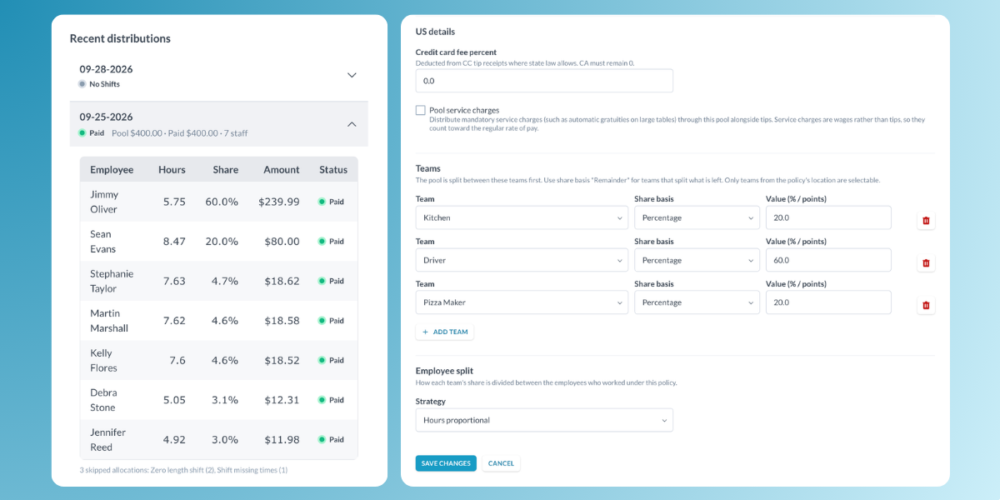
  • Choose your pooling period: Split tips daily, weekly, or by pay period.
  • Use different split strategies: Allocate a fixed percentage to one team, such as 30% to the bar, then split the remainder using points or hours worked.
  • Create separate pools for different shifts: Run lunch and dinner pools side by side so tips go to the employees who worked those shifts.
  • Handle different tip types: Track cash tips, credit card tips, and service charges separately so each can be taxed and reported appropriately.

Also read: Should You Implement Tip Pooling? Pros, Cons, and Best Practices for Restaurants

Build compliance into the process

Calculating the split is only part of managing a tip pool. You also need to account for who can participate, which fees can be deducted, and how each distribution was calculated.

Tip Pools helps build those requirements into the process:

  • Managers are automatically excluded from tip pools, removing the need to check eligibility manually.
  • Credit card processing fees can be handled based on state rules. Where permitted, they can be passed through to the tip pool; in states such as California, where this isn’t allowed, the deduction is blocked.
  • Every calculation is recorded, giving you a clear record of how tips were distributed for each period.

From POS to paycheck

Tips can flow into Workforce.com automatically as a daily total through your POS integration, or you can add them directly.

Workforce.com calculates each employee’s share as tips are added, keeping it up to date if receipts or shifts change, then adds it to their timesheet and carries it into the next pay run.

That means the process can move from POS → tip pool → timesheet → payroll without having to calculate and transfer tip amounts between separate spreadsheets and systems.

Already using Tip Jars?

You can move a location to Tip Pools at any time. Historic Tip Jar data stays intact, and other locations can stay on Tip Jars while you switch over at your own pace. A location moves over in one step, so once you create a pool for it, that location’s tips run through the pool going forward. 

Reach out to our support team whenever you’re ready to make the switch.

Getting started

For a closer look and detailed steps to setting up teams, shift groups, pooling rules, and payroll, check out our Tip Pools help guide. 


Curious how Tip Pools fit into the bigger picture? Book a demo to see how tip pooling works alongside scheduling, time and attendance, and payroll in one system.

Posted on December 16, 2020June 29, 2023

How custom fields builds flexibility and simplicity into workforce management

custom fields, workforce.com

Flexibility is crucial to managing employees.

Advanced workforce management software features such as custom fields improve that flexibility and support immediate, real-time decision making.

The benefits of custom fields

Custom fields eliminate one-size-fits-all rigidity and give managers the flexibility to add, update and store any data on employee files. It’s configurable by groupings of fields and can easily display individuals or customized teams of employees.

Workforce.com recognized the value that custom fields provide to meet employers’ operational needs. Every business has unique circumstances and demands, said Leon Pearce, Workforce.com’s lead software engineer. Integrating additional flexibility into Workforce.com’s software caters to their unique needs.

“There are core common problems that every business faces,” Pearce said. “They need to do scheduling. They need to record employees’ time and make sure they’re compliant. But maybe their industry also has unique requirements. Even down to a single business, there may be unique obligations. Custom fields improve how they’re working. We add an extra layer of flexibility, which helps them achieve their goals.”

Easily track and identify employee needs

With core operations, Workforce.com can take the full schedule experience and customize that for a mobile workforce. Because employees frequently move from site to site, custom fields provide immense value to monitor who is where and when.

Custom fields also can be used to track everything from each employees’ T-shirt size to a specific shift schedule or location assignment, said Michael Valentine, vice president of accounts. “Some organizations provide specialized equipment or clothing for their employees,” Valentine said. “Using custom fields keeps track of boot sizes for employees on a construction site.”

custom fieldsValentine added that in one case an airline needed to store data on pilots’ flight hours annually. They created a custom field and continuously reported on it while scheduling pilots. Customizing the schedules of multiple employees also eliminated the need to memorize their location.

“It can be hard to remember, so having the ability to include an address and some notes that are unique to that location is really useful,” said Pearce, who was instrumental in developing the Workforce.com custom fields feature. “Being able to add fields to schedules that are completely unique makes operations a lot easier. We designed a simplified approach to set up custom fields. We made this seamless so business admins can get in, make changes and updates and get the value out of it themselves directly rather than relying on an IT department to do it.”

Improving the user experience

Custom fields can be used with most core workforce management functions and across multiple departments.

It’s a straightforward process to add a field, Pearce said. Once the object to customize is selected — a timesheet, employee profile or a schedule, for example — the field gets a name and the information is included.

“The most common one is text, but you can make a special field, like a day, or you can make it a file and that customizes the user experience. It’ll add a button to the schedule that allows you to upload the file. And that’s basically it.”

Adding a custom field to “employee” populates the employee profile. Adding a field to an employee’s schedule shows up on the schedule-building tool, which also can appear on their mobile app.

The same is true with timesheets, Pearce said, noting that it will be added to the timesheet review process. “You can export to other systems,” he said. “So you can leverage that information going out of the system.”

Custom fields also can be set up in the mobile Workforce.com app, Pearce said. Users can automatically link information, say from a particular location, in the employee’s app so they can get background, such as the address and some specific circumstances about that site.

Workforce.com’s custom fields feature

Simplification is the key feature when comparing Workforce.com to other systems that allow for added fields. Workforce.com’s custom fields capabilities are much more simple to use compared to other systems that allow for added objects. Customization also evolves along with an organization’s changing needs, shifting with what’s important to a business. 

Interestingly, custom fields have yielded at least one unintended consequence since the COVID-19 pandemic hit, Pearce said.

“People have come up with some great ideas to use custom fields for storing information around COVID-19,” he said. “People are being empowered to solve these problems themselves. As someone who’s building the software, it’s been the coolest thing to see.”

While custom fields are not new to workforce management software, Workforce.com’s integration into the operational process is innovative and provides exciting new results. Integrating custom data points to employees’ schedules or exporting it into a payroll and invoicing system improves workflow. Tracking shift data and embedding into the time and attendance process saves money.

“That is a big breakthrough that we’ve had,” Pearce said. “We’re definitely leading and paving the way in that direction. Custom fields are taking our software to the next level in terms of helping businesses solve these problems.”

Organize your employee data with custom fields and get Workforce.com’s scheduling platform working for your business. Request a demo today!


Webinars


White Papers


  • Topics

    • Benefits
    • Compensation
    • HR Administration
    • Legal
    • Recruitment
    • Staffing Management
    • Training
    • Technology
    • Workplace Culture
  • Resources

    • Subscribe
    • Current Issue
    • Email Sign Up
    • Contribute
    • Research
    • Awards
    • White Papers
  • Events

    • Upcoming Events
    • Webinars
    • Spotlight Webinars
    • Speakers Bureau
    • Custom Events
  • Follow Us

    • LinkedIn
    • Twitter
    • Facebook
    • YouTube
    • RSS
  • Advertise

    • Editorial Calendar
    • Media Kit
    • Contact a Strategy Consultant
    • Vendor Directory
  • About Us

    • Our Company
    • Our Team
    • Press
    • Contact Us
    • Privacy Policy
    • Terms Of Use
Proudly powered by WordPress